A lot is changing here. Stay informed with what is coming out of FRONTSTEPS and all of the new products we are releasing
Release Notes


FRONTSTEPS
Manager
November 3rd, 2026
Version: Vendors Hardening
What’s New
Find Any Vendor, Including by Tax ID
Answer “do we already have this vendor?” in seconds.
Feature Overview: Search by name, DBA, code, location, activity type and, for users allowed to see them, EIN, state tax ID or SSN. Filter by community and choose your own columns.
Benefits:
- Fewer duplicates: Check a W-9 against existing vendors before creating one.
- Your view: Columns you choose are remembered.
Export, Notes, Ratings and Documents
The full vendor file, in Manager.
Feature Overview: Export exactly what is on screen or a full record of chosen vendors. Add notes with job and admin ratings, and keep W-9s, contracts and certificates on the vendor’s Records tab.
Benefits:
- No more Caliber trips: Notes, ratings and documents are created in Manager and shared with Caliber.
- Rate as you go: Closing a work order can prompt for a vendor rating.
Merge and Import Vendors
Clean up and load vendors in bulk.
Feature Overview: Merge duplicates into the vendor you keep, moving invoices, payments, credits, work orders and assignments. Import vendors from a spreadsheet, with a test run first and a downloadable list of failed rows.
Benefits:
- Cleaner vendor lists: One vendor, one record.
- Fast onboarding: Load a new portfolio’s vendors in one import.
Manage Vendors From the Community
Everything a manager needs, where they work.
Feature Overview: Community → Contacts → Vendors assigns vendors, creates, opens and deletes them, and enters an invoice with the vendor pre-filled. Other Payees can be maintained and converted to vendors.
Benefits:
- Faster setup: Assign the community’s vendors in one dialog.
- One-off payees handled: Keep them tidy, and promote them to vendors when they become regulars.
Reference Lists, Permissions and Safer ACH
Fewer surprises.
Feature Overview: Maintain insurance types and activity types in Manager, copy one vendor’s assignments to another, see payment-hold flags on policy cards, confirm before switching ACH, and see only the actions you can use.
Benefits:
- No dead buttons: Every vendor action works for the people who see it.
- Fewer accidental changes: ACH changes need a confirmation.
October 30th, 2026
Version: Work Orders Hardening
What’s New
Time and Materials and Vendor Invoices
From work order to vendor invoice, all in Manager.
Feature Overview: Maintenance companies record labor and materials on the work order and click Generate Invoice to create the maintenance company invoice and the matching Payables invoice. GL expense accounts are filled in from existing mappings.
Benefits:
- No more Caliber trips for invoicing: The whole job, start to invoice, lives in Manager.
- Billed once: Lines are never invoiced twice, even when two people generate at the same time.
- Accurate costs: Rates come from the employee list and prices from the materials catalog.
Recurring Work Orders
Schedule repeating maintenance once.
Feature Overview: Memorize a work order with a schedule, then generate the next batch for many communities from Memorized Work Orders.
Benefits:
- Less repetitive data entry: Quarterly and annual work is set up once.
- Portfolio-wide: Generate across communities in one action.
Smarter Vendor Picking
The right, insured vendor first.
Feature Overview: The vendor picker suggests vendors whose trade matches the work, and flags vendors with expired or missing insurance.
Benefits:
- Faster assignment: Matching vendors are at the top.
- Lower risk: Insurance problems are visible before you assign.
Maintenance Company Administration
Run the maintenance company in Manager.
Feature Overview: Management → Maintenance Company manages company vendors, employees and hourly rates, the materials and services catalog and the default sales tax code.
Benefits:
- One place for setup: Everything Time and Materials needs is maintained in Manager.
Custom Statuses and Community Settings
Work orders that match how you work.
Feature Overview: Add custom work order statuses mapped to Open, Closed, Monitored or Service Request, and edit each community’s work order settings in Community → Management Setup → Work Orders.
Benefits:
- Clear status for everyone: Statuses like “Awaiting Parts” without breaking filters or letters.
- No Caliber for settings: Past-due days, template override and Service Request emails are edited in Manager.
Faster Work Order List and Creation
Fewer clicks for everyday work.
Feature Overview: Close many work orders at once, see why a row is red, find the right community’s common areas when creating a work order, and send a letter to the assigned vendor without re-picking it.
Benefits:
- Bulk close: Close a batch of finished work orders in one action.
- Fewer mistakes: Search results are scoped and labeled by community.
October 30th, 2026
Version: ARCs Hardening
What’s New
Approved and Rejected Requests Keep Their Steps
Finish every request in Manager, including the final letter.
Feature Overview: After a request is approved or rejected, a compact banner shows who decided and when, and the closing stage’s steps stay on the page so the final letter, fee or board step can still be completed.
Benefits:
- No more stuck requests: Every step of the closing stage can be completed, whatever its type.
- Homeowners get their final notice: The decision letter is sent from the same page.
- A counter you can trust: “Stage X of Y” stays accurate.
Add or Remove a Step on One Request
Handle the one-off case without changing the process.
Feature Overview: EDIT STEPS on a request adds a step to the current stage, or removes one, for that request only.
Benefits:
- One-off fees and approvals: Add exactly what this request needs.
- Process stays clean: The Master and community processes never change.
Per-Community ARC Process Overrides
Tailor a community’s ARC process in Manager.
Feature Overview: Community → Management Setup → ARCs lets administrators include or exclude stages, set durations, choose which request types each stage applies to, and add, edit or remove steps for that community. Clear overrides resets it to the Master process.
Benefits:
- No Caliber trip for setup changes: Community-specific ARC setup lives where the rest of the community setup lives.
- Shared with Caliber Desktop: Changes show in both places.
Reverting a Step Keeps the Letter and the History
Undo safely.
Feature Overview: Reopening a completed step no longer hides letters that were already sent or printed, and the activity log keeps the step’s earlier entries plus a new “Step reverted” entry with who and when.
Benefits:
- A complete audit trail: You can always see what was sent, and who reverted it.
- Letters stay on record: Sent and printed letters stay in the Letters panel.
Better Notes
Delete, skip the category, or write to the homeowner only.
Feature Overview: ARC notes can be deleted, no longer require a category, and have a new “Homeowner Only” option that emails just the homeowner.
Benefits:
- Fewer clicks: Save a quick note without picking a category.
- The right audience: Ask the homeowner for a missing item without notifying the committee.
Clearer Requests
See instructions, submissions and setup problems at a glance.
Feature Overview: Steps show their Caliber instructions from an info button; documents uploaded through a workflow step are tagged “Submitted with request”; a request type that is not set up now gives a message naming the type, process and community; and the activity log always reads in the order things happened.
Benefits:
- Less guesswork: Staff see the instructions and the homeowner’s submissions right away.
- Faster fixes: Administrators know exactly what to change.
October 29th, 2026
Version: Group Reports Management & Ad Hoc Group Reports
What’s New
Manage Report Groups
Build and maintain your report groups in Manager. No more trips to Caliber Desktop to change a board packet.
Feature Overview: Administrators open Reporting → Manage report groups to create, rename, and delete report groups, add and remove reports, drag them into print order, give a report its own name inside a group, and pick the group’s cover sheet. Groups are company-wide and shared with Caliber Desktop.
Benefits:
- Board packets built in Manager: Create and change the report groups used for board meetings and month end without opening Caliber.
- The order and names the board expects: Drag reports into print order and rename a report inside a group, for example “Board Balance Sheet”.
- Cover sheets print from Manager: Pick a cover sheet for the group and Manager prints it in front of each community’s reports.
- Nothing to set up again: The groups you already have in Caliber are the same groups in Manager, and edits show in both.
- Safe for teams: If someone else saved the group first, your save is stopped so no one’s changes are lost.
Run Ad Hoc Reports
Pick the reports, the communities, and the period, and run them once. No group to build first.
Feature Overview: RUN AD HOC, next to RUN NEW REPORT on the Reporting page, runs up to 40 reports in the order you pick for any of your communities over one period. You get one PDF per community and, by default, one combined PDF for all of them.
Benefits:
- Answer one-off requests fast: Auditor or board asks for a specific set of reports? Run exactly those, with no group to create or clean up.
- A whole portfolio in one file: Combine every community into one PDF, and still get a separate PDF for each community.
- Keep working: Runs happen in the background and appear in Recently Run Reports.
- For every Reporting user: Anyone who can open Reporting can run ad hoc reports for their own communities, as in Caliber.
Clearer Results on Every Report Group Run
See which communities were included and why any were skipped.
Feature Overview: Saved and ad hoc report group runs now show “N included, M skipped” with a reason for each skipped community. When some communities fail, the others still finish and a combined PDF is marked “Partial: n of m communities”.
October 23rd, 2026
Version: Reporting
What’s New
Run Any Report from One Button
Every individual report your team runs in Caliber, one click away in Manager.
What we built: A Run New Report button on the Reporting page with two choices: Individual Report and Report Group. Individual Report opens a full-screen report runner with the Caliber report catalog. Staff search or browse by category, fill in a short form, preview the report, and download it as a PDF. Available on web.
Why we built it: Running a single AR Aging, Owner Ledger, or Balance Sheet still meant opening Caliber Desktop. Reporting was one of the most common reasons Manager users switched back to Caliber during the day, and one of the first questions prospects ask about replacing Caliber.
Value:
- Every report, without Caliber: The individual reports staff rely on for month end, board meetings, and owner questions run from Manager.
- Find the right report fast: Search by name or browse by category. Each report has a plain-language description and an estimated run time.
- Fewer reruns: Help text on every field, lists limited to the chosen community, and required-field checks catch mistakes before the report runs.
- Check before you share: The report previews next to the form, so staff can adjust options and generate again without leaving the page.
- Results that match Caliber: Each report is checked against Caliber with the same options before it is released.
How to use it: Go to Reporting and click Run New Report, then Individual Report. Pick a report, choose the community and dates, click Generate Report, and then Download PDF.
One History for Every Report
Find any report run in the last 90 days, individual or group, and open it again.
What we built: Recently Run Reports now lists individual report runs alongside report group runs. Each row shows the report name, community, type (Individual Report or Group Report), status, and create date, and every column can be sorted. Individual runs can be viewed or downloaded again from the row. Group runs expand to show each community. Available on web.
Why we built it: An individual report used to disappear as soon as it was closed. Staff ran the same report again, or searched email and download folders for a copy.
Value:
- One place for run history: Every report from the last 90 days, individual or group, is in one list.
- Sort to find it fast: Sort by name, community, type, status, or date.
- No running it twice: View or download a past report straight from its row.
How to use it: Go to Reporting. Recently Run Reports is on the Reports tab. Click a column header to sort, then use the view or download icon on the row you need.
September 28th, 2026
Version: Architectural request note visibility defaults
What’s Improved
Default Visibility for Architectural Request Notes
Notes that managers and directors add to architectural requests on the web are now visible to everyone by default, matching the mobile app.
Previous Behavior:
When a manager or director added a note to an architectural request on the web, the note defaulted to “Visible to Managers only.” The mobile app already defaulted to “Visible to Everyone,” so the same action could produce different results depending on where the note was written. Residents could miss notes that were meant for them.
Resolution:
Architectural request notes added on the web now default to “Visible to Everyone” in both Community Records and My Reservations & Requests, matching the mobile app. Managers and directors can still change visibility on any note before saving it.
September 23rd, 2026
Version: ARC PDFs and faster bulletin email delivery
What’s Improved
Architectural Request PDFs with Checklist Items
PDFs of architectural requests that include checklist items no longer contain blank pages.
Previous Behavior:
When a PDF was generated for an architectural request whose form included checklist items, the PDF contained unexpected blank pages. The document looked incomplete or unprofessional, and users had to clean it up by hand before sharing or saving it.
Resolution:
Architectural request PDFs now generate without extra blank pages. Checklist content still appears correctly, and PDFs for requests without checklist items are unaffected. Users can share and store these PDFs as-is.
Bulletin Email Delivery Times
Bulletin emails are delivered more promptly during busy sending periods.
Previous Behavior:
During high-volume sending periods, especially on Fridays, bulletin emails could back up and reach residents hours after they were sent. Time-sensitive community communications arrived late, causing confusion for residents and associations.
Resolution:
Bulletin emails are now processed more efficiently during peak periods to reduce delays. Associations can count on timely delivery for important community communications.
September 22nd, 2026
Version: Mobile events order and more reliable sign-in
What’s Improved
Community Events Order in the Mobile App
Community events in the mobile app now appear in date order.
Previous Behavior:
On the mobile app’s Community Events screen, events could appear out of chronological order. Residents could miss or misread upcoming events.
Resolution:
Community events in the mobile app are now listed in date and time order, so residents can quickly see what’s coming up next.
Mobile App Sign-In When the Connection Drops
If the connection drops during sign-in, the mobile app now lets you retry instead of continuing with the wrong sign-in method.
Previous Behavior:
If the network connection dropped or briefly failed right after a user entered their email address on the mobile app’s sign-in screen, the app could continue with the wrong sign-in method without any warning. The user could end up on an unexpected sign-in path until they logged out.
Resolution:
The mobile app now recognizes when it can’t complete that step, tells the user, and lets them try again. Users always sign in through the correct method for their account.
September 11th, 2026
Version: Accurate email open rates and event locations
What’s Improved
Resident Engagement Open Rates
Email open rates in Resident Engagement reporting now reflect unique recipients and no longer exceed 100%.
Previous Behavior:
Resident Engagement reporting counted every open of a communication, including repeat opens by the same recipient, when calculating Open Rate. As a result, some communications showed Open Rates above 100%, and management teams couldn’t tell what share of residents had actually viewed a message.
Resolution:
Open Rate is now based on the recipients who opened a communication rather than the total number of opens. Management teams get an accurate picture of how many residents a communication reached and can make better decisions about community outreach.
Location Field on New Events
Managers can once again add a location when creating a community event.
Previous Behavior:
The Location field was missing from the event creation form, so managers could not say where a new event would be held. Earlier events still showed their locations, but new ones couldn’t include one, which could leave residents unsure where to go.
Resolution:
The Location field is back on the event creation form. Managers can add a location to new events, and residents can see where each event is taking place.
September 10th, 2026
Version: Folder-only documents, stability, bulletin, and amenity fixes
What’s New
Folder-Only Document View
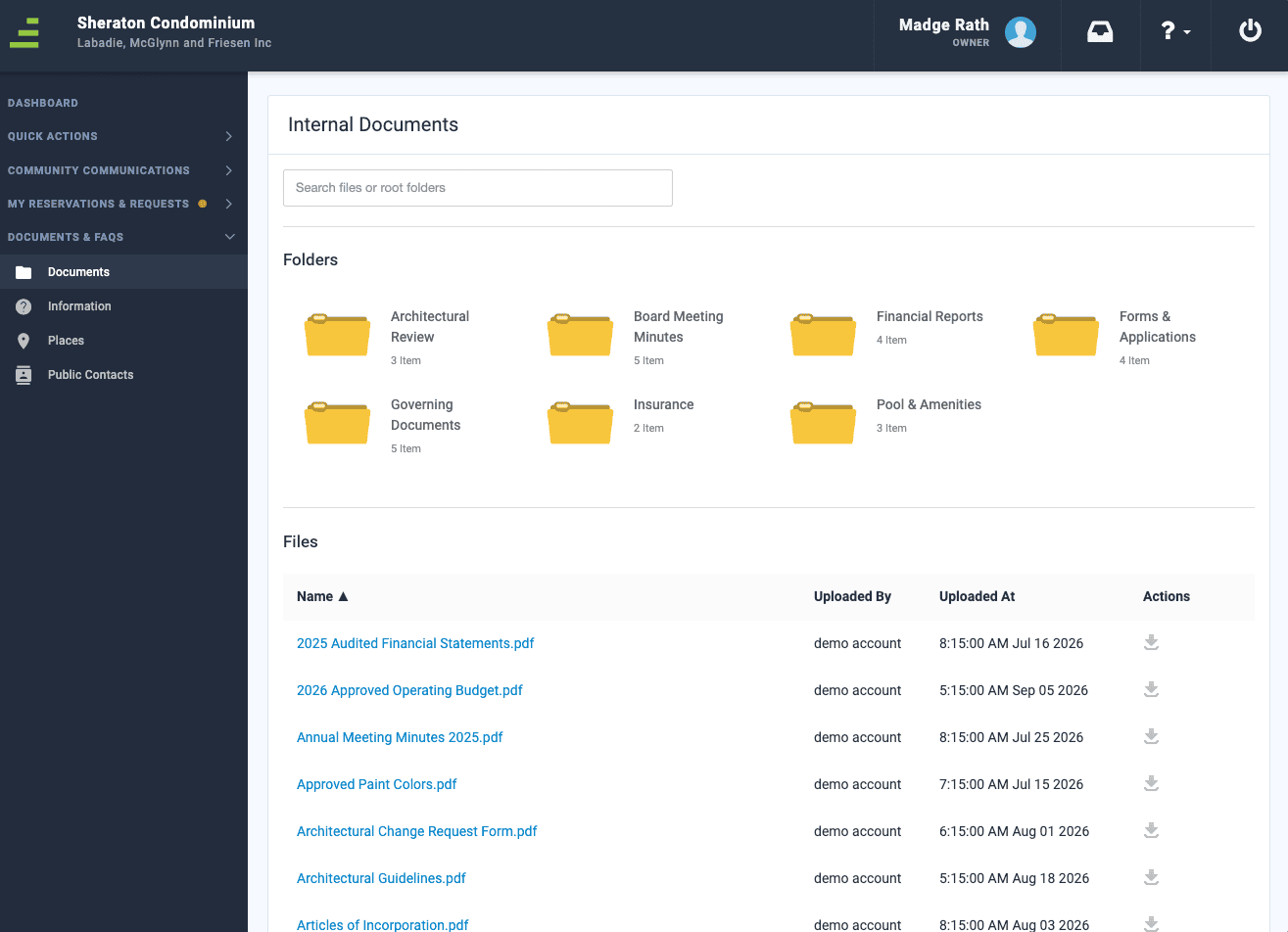
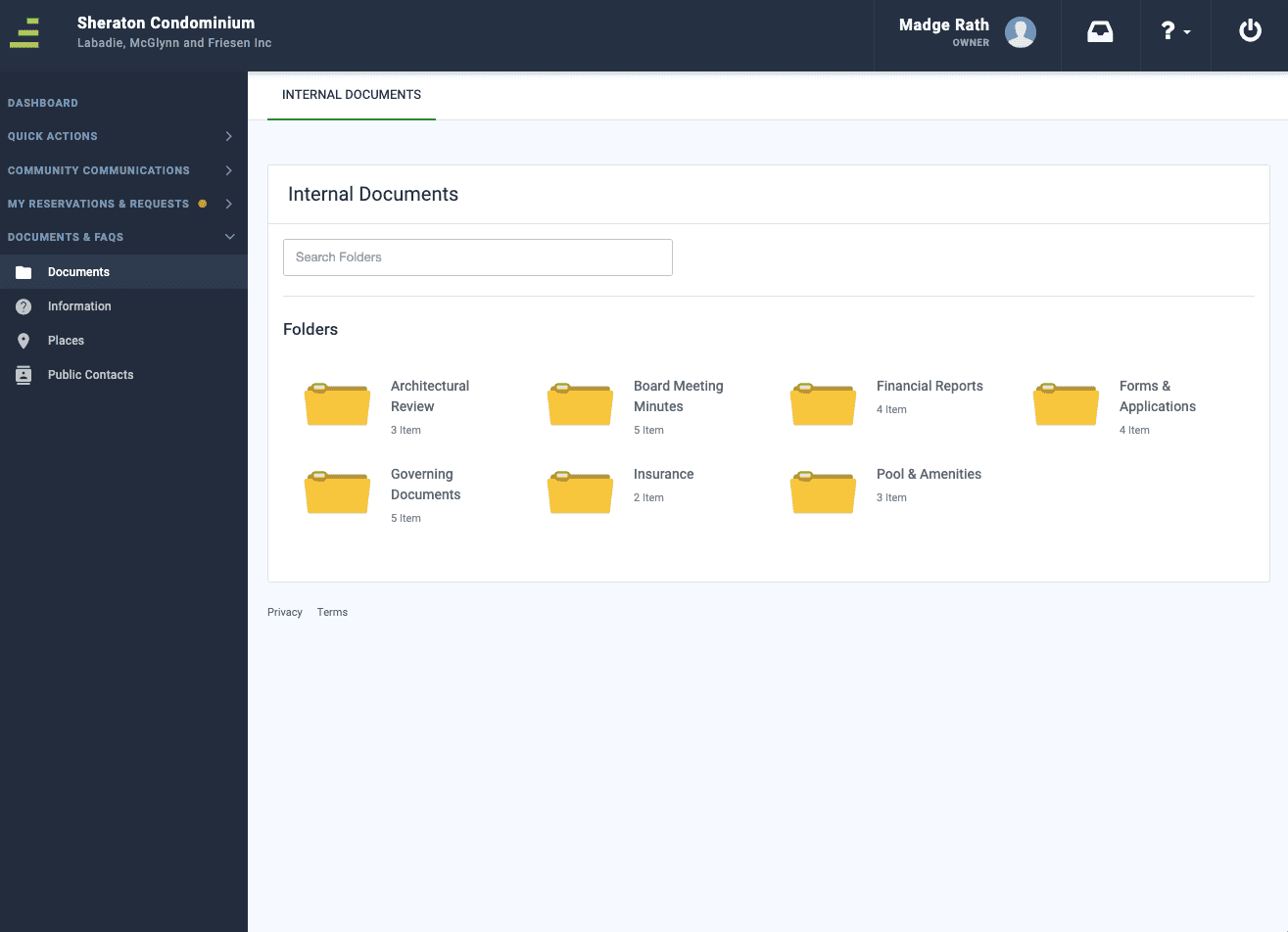
Management companies can now choose to show documents by folder only, hiding individual file lists and the “Updated At” column.
Feature Overview:
A new management-company-level setting changes how documents are presented across all of that company’s communities. When the setting is on, the Internal, Accounting, and External Documents screens and the Community Records section show folders only. Individual file lists and the “Updated At” column are hidden. The search fields on these screens are relabeled “Search Folders” to match what they return. The setting is being enabled gradually, company by company, and is available on the web.
Before the change
After the change
Benefits:
- Cleaner document navigation: Residents and board members browse by folder instead of scrolling through long file lists.
- Consistent across communities: One company-level setting applies the same experience to every community the company manages.
- Less confusion over dates: Removing the “Updated At” column avoids questions about when a document was last changed.
What’s Improved
Managers moving between pages and communities see far fewer unexpected error pages.
Previous Behavior:
Some managers ran into intermittent error pages while navigating the portal, most often in Bulletins, in Community and Accounting Settings, and when switching between communities. In some cases, the error logged the manager out and cost them unsaved work. The problem was sporadic, which made it frustrating and hard to predict.
Resolution:
The underlying causes of these intermittent errors have been addressed. Managers can move between tabs, settings, and communities more reliably, without losing their place or their work.
Scheduled Bulletin Emails
Scheduled bulletins now arrive in residents’ inboxes once, not twice.
Previous Behavior:
When a bulletin was scheduled to send at a future date and time, some residents received duplicate copies of the same email on the scheduled send date. Duplicates cluttered inboxes, prompted resident complaints, and risked important communications being ignored or marked as spam.
Resolution:
Scheduled bulletins now send a single email to each recipient on the scheduled date. Managers can schedule communications with confidence that residents will receive one clean copy.
Amenity Booking Approval Alert
Approving a booking for a free amenity no longer shows a payment alert.
Previous Behavior:
When a manager approved a booking for an amenity that requires manual approval but no payment, Community displayed a “Capture Payment on Approval” alert even though there was nothing to charge. The alert was confusing and suggested a payment step that didn’t apply.
Resolution:
The payment alert now appears only when approving bookings for paid amenities. Managers can approve free bookings without an unnecessary payment prompt.
September 9th, 2026
Version: Architectural request note author attribution
What’s Improved
Architectural Request Note Authors
Notes on architectural requests now show who actually wrote them.
Previous Behavior:
Notes added to architectural requests by residents, board members, and other non-manager users could display a generic “API User” as the author instead of the person who wrote the note. Only manager notes consistently showed the author’s name, so other users sometimes typed their own name into the note body just to be identified. This made it harder for review committees and managers to follow the discussion on a request.
Resolution:
Architectural request notes now display the name of the person who added them, whatever their role. Managers, board members, and review committees can see who said what on a request without extra steps.
September 8th, 2026
Version: Calendar Filters and Event Navigation
What’s New?
Statement Runs in FRONTSTEPS Manager
Community Association Managers and Accounting staff can now create, run, and deliver homeowner statement batches directly from FRONTSTEPS Manager — no Caliber Desktop required.
What’s Improved
Filtering the calendar and moving between events no longer produces an error page.
Previous Behavior:
When a user set the Calendar filter to “None” (to show only events they created) and then refreshed the page or opened an event, Community displayed an error page instead of the calendar or event details. In some cases, opening an event and returning to the calendar would also fail to load. Residents and staff lost access to event information and could not rely on the calendar filter.
Resolution:
The calendar now loads correctly with any filter applied, and users can open an event and return to the calendar without errors. Residents and managers can filter to their own events and view event details as expected.
Deleted Work Order Documents
Documents removed from a work order in Caliber are now removed from Community as well.
Previous Behavior:
When a document attached to a work order was deleted in Caliber, the file continued to appear on the homeowner’s work order in Community. Residents could still see and download a document the management team had intentionally removed.
Resolution:
Document deletions on work orders now carry over from Caliber to Community, so residents see only the documents that are currently attached to their work order.
Closed Violation Status from TOPS Pro
Violations closed in TOPS Pro now display as closed in Community.
Previous Behavior:
A violation that had been closed in TOPS Pro could continue to display as open in Community, creating confusion for management teams and residents and leading to unnecessary follow-up.
Resolution:
Closed violation statuses from TOPS Pro now display accurately in Community, keeping violation records consistent across both systems.
Architectural Request Notes in Caliber
Notes added to architectural requests in Community now appear in Caliber exactly as they were written.
Previous Behavior:
When a note was added to an architectural request through Community, the note appeared correctly in Community but showed up in Caliber with “+” symbols in place of the spaces between words, making notes hard to read for the management team.
Resolution:
Architectural request notes now carry over to Caliber with their original spacing and formatting, so managers working in Caliber can read resident and board notes clearly.
September 1st, 2026
Version: Statements
What’s New?
Statement Runs in FRONTSTEPS Manager
Community Association Managers and Accounting staff can now create, run, and deliver homeowner statement batches directly from FRONTSTEPS Manager — no Caliber Desktop required.
Feature Overview
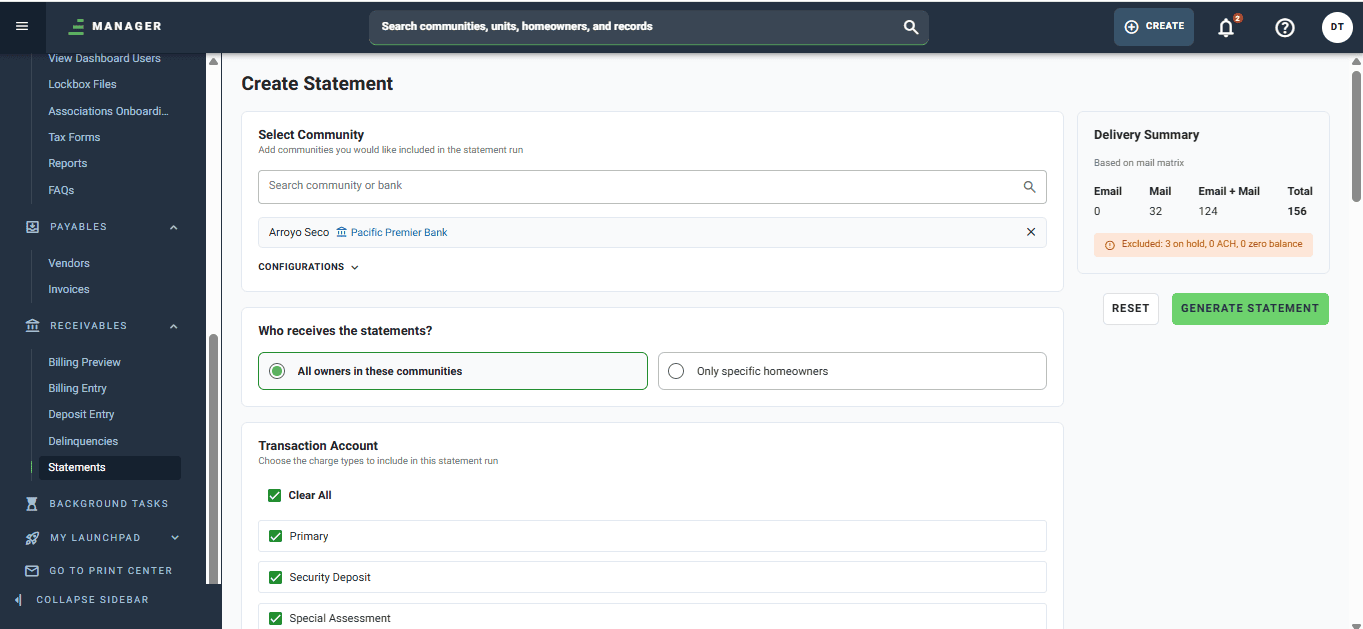
The Create Statement screen brings the full statement run workflow to the browser. From a single page, users select the communities and transaction accounts to include, configure statement content, and choose how statements should be delivered — all using the bank, coupon, late fee, and ACH/FSPay configuration already set up in Caliber, with no re-entry required.
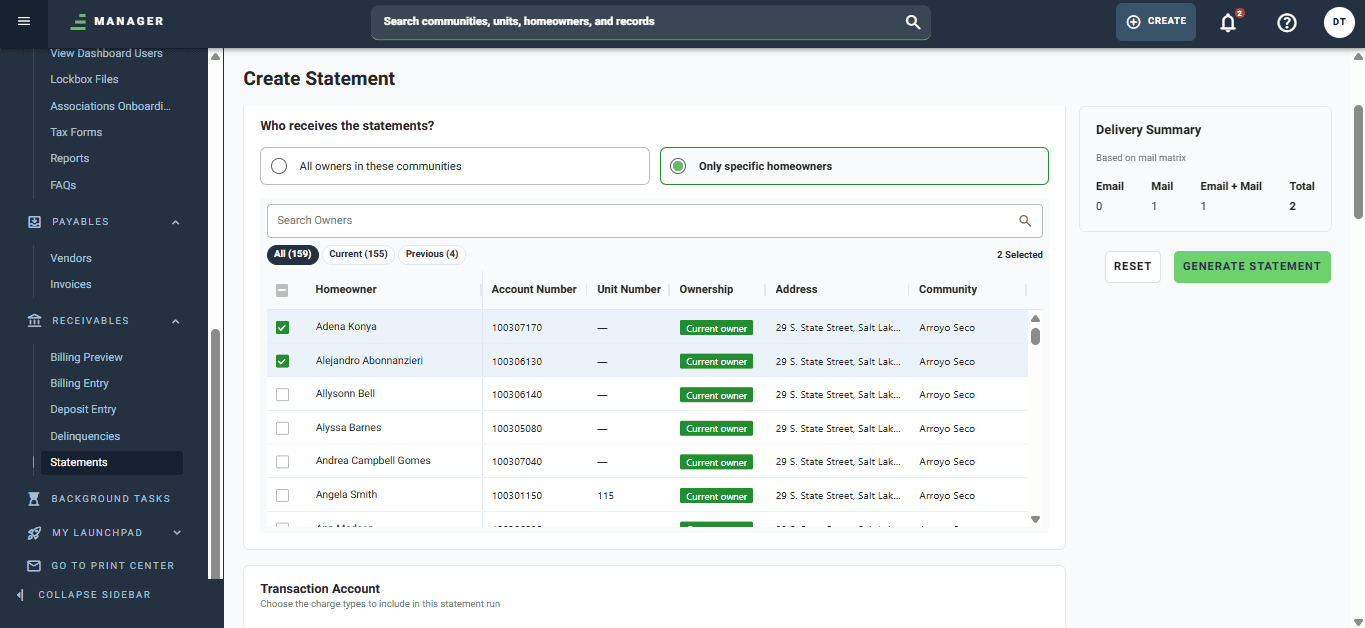
From the Create Statement screen, users can:
- Select communities and transaction accounts to include in the run, with an optional balance-range filter to narrow which owners are picked up.
- Configure statement content, including adding a detachable payment coupon or generating a print-as-invoice version that shows only outstanding charges as of the statement end date.
- Choose specific owners, filtering by current, prior, or both, instead of generating statements for every homeowner in a community.
- Preview a delivery summary — a live count of owners by delivery type (Email, Mail, Email + Mail, Total) — before committing to a run, so the right owners are included every time.
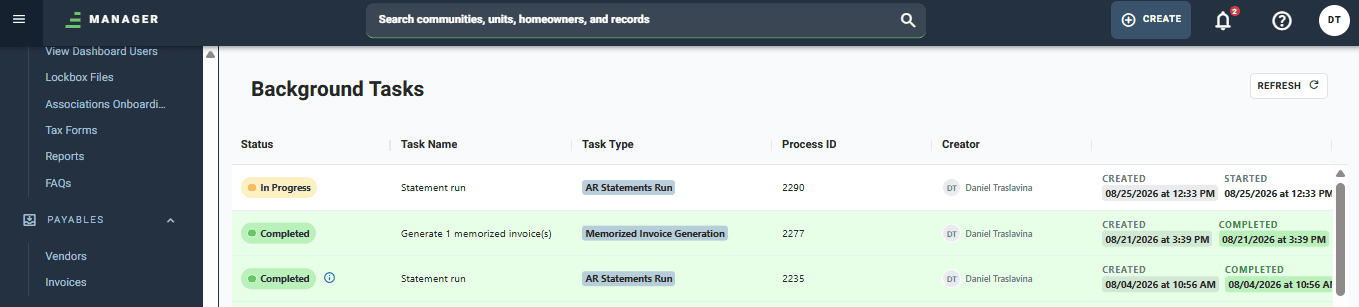
- Run statements without blocking their browser. Batches process in the background with a real-time progress indicator, and users get a completion notification whether they stay on the page or navigate elsewhere in Manager.
Once a run completes, statements are delivered as a local PDF download and/or emailed to owners via Hydra, based on each community’s mail matrix settings. Owners with an active ACH or FSPay scheduled payment are automatically excluded when the community setting is enabled, and a copy of each statement is saved to the owner’s record in Caliber by default.
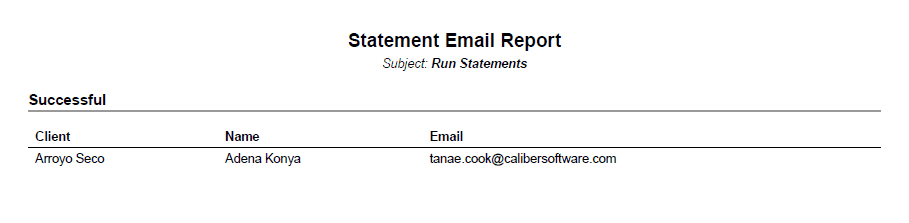
If a run includes email delivery, users are offered a link to the Statement Email Report directly from the completion notification. The report lists each homeowner who was emailed a statement, the address(es) used, their community, and a delivery status of Sent or Failed. Any failures are clearly highlighted with a human-readable reason (for example, an invalid email address), and the report can be exported or printed for record-keeping.
This release does not yet include delivery through the FRONTSTEPS Print Center (PagePerPage); that capability, along with the rest of the statement run experience, is planned for a future release.
This feature is available on web only.
Benefits
- Run Statements From Anywhere: Statement batches no longer require a specific desktop machine — CAMs and accounting staff can initiate and monitor a run from any browser, in the office or in the field.
- No More Blocked Workstations: Because runs process asynchronously, users can keep working in Manager while a batch generates, instead of watching a local machine sit idle until it finishes.
- Confidence Before You Run: The pre-run delivery summary shows exactly how many owners will receive statements by email, mail, or both, so mistakes are caught before generation instead of after.
- Precise Owner Targeting: Balance-range filtering and owner-level selection make it easy to run statements for the exact set of homeowners a batch is meant for, without extra manual work.
- Delivery Confidence, Built In: The Statement Email Report gives staff immediate visibility into what was sent and what failed, with human-readable reasons that make troubleshooting fast — no need to escalate to support.
- Consistent With Existing Setup: Bank details, coupon layouts, and late fee configuration are read directly from Caliber, so there’s nothing new to configure to start running statements in Manager.
September 1st, 2026
Version: Vender Management
What’s New?
Vendor Management
Managers and Administrators can now manage the entire vendor lifecycle — from onboarding and insurance compliance to work order history and payments — without ever leaving FRONTSTEPS Manager.
Feature Overview
Vendor Management brings a complete, centralized vendor experience to Manager. Community Association Managers, AP Staff, and Operations Coordinators can now create and maintain vendor records, track compliance, and review a vendor’s full history directly from a single screen, eliminating the need to switch to Caliber for vendor-related tasks.
From the new Manage Vendors area (Accounting > AP), users can:
- Browse and filter vendors in a centralized list showing name, activity type, assigned community count, average rating, and an at-a-glance payability status.
- Create and maintain vendor records, including contact information, activity types, and active/inactive status.
- Track insurance compliance, with automatic enforcement that blocks payment to vendors with missing or expired insurance when the management company has insurance tracking enabled. Vendors can also be marked exempt when appropriate.
- View a vendor’s work order and invoice history directly from the vendor record, with one click into a pre-filtered list scoped to that vendor — a view that has never existed in Caliber.
- Capture notes and ratings after work is completed, in a lightweight, low-friction format designed to encourage regular use.
- Manage 1099 adjustments, ACH banking details, and W-9-based tax information needed for accurate payment and reporting.
- Assign vendors to specific communities and divisions, controlling which vendors are available for work orders and invoices in each community.
- Set mailing preferences to control how work order notifications are delivered to each vendor (email, mail, both, or neither).
Because Manager and Caliber share the same underlying data platform, all existing vendor records, invoice history, and work order data are available immediately — there is no migration step required.
Benefits
- One system for every vendor task: Managers and AP Staff can now create, assign, insure, note, and pay vendors entirely within Manager, removing the constant back-and-forth with Caliber that slowed down daily work.
- Payment confidence, at a glance: Color-coded payability status makes it immediately clear whether a vendor is compliant and eligible for payment, reducing the risk of paying a vendor with expired or missing insurance.
- Operational history in one place: Work order and invoice history are now surfaced directly on the vendor record — a view Caliber never offered — turning the vendor profile into a true operational reference instead of a static address book.
- Lower-friction feedback: Notes and ratings are quick to capture, making it easier for teams to build a reliable performance history for every vendor over time.
- Cleaner vendor selection: Community and division assignments ensure that only relevant, approved vendors appear when creating work orders and invoices for a given community.
July 10th, 2026
Version: Delinquencies
What’s New?
Delinquency Management
AR Specialists can now view, investigate, and process delinquency runs directly in FRONTSTEPS Manager.
Feature Overview
Delinquency Management brings the complete delinquency workflow into FRONTSTEPS Manager across three connected areas. The Delinquency Account List gives AR Specialists a full view of all accounts in active delinquency, with grouped (by account) and per-charge views, filters across community, process, stage, and vendor, and Excel export for external analysis. Clicking any account opens a Detail View showing delinquency records, sent correspondence, a filterable audit trail, community rules, and complete fee and charge history — all on one page. When it is time to run delinquency, AR Specialists configure run parameters, generate a preview of all accounts and actions before committing, exclude individual exceptions for the current run, and post — with processing handled in the background so staff can continue working and return to download generated statements, letters, and run reports when complete. Available on web.
Benefits:
- A Complete Delinquency Queue in One View: AR Specialists can see all accounts in active delinquency — with stages, aging, days past due, and next actions — in a single sortable, filterable list, without needing to pull reports or work from exports to manage daily workload.
- Full Account History Without Leaving the Page: Clicking any account surfaces a detailed view of delinquency records, sent correspondence, fee and charge history, audit trail, and community-specific delinquency rules — all from one place in Manager.
- Preview Before You Post: The Run Delinquency workflow includes a full preview of every account and action that will be affected before committing, the ability to exclude individual exceptions for a run without changing permanent configuration, and a downloadable preview report that is saved automatically for audit purposes.
- Background Processing Keeps Work Moving: Delinquency runs execute as background tasks. AR Specialists can navigate to other work and return when processing completes to download generated statements, letters, and run summaries directly from Manager.
July 10th, 2026
Version: Accounts Payable
What’s New?
Invoice Viewer
The AP module’s home base — a centralized list and detail view for every invoice across your portfolio.
Feature Overview:
The Invoice Viewer gives AP Specialists and Property Managers a filterable list of all invoices across their communities, organized into tabs for All, Awaiting AP Approval, Awaiting Manager Approval, and Ready to Pay. Selecting any invoice opens a full detail view with line items, approval history, payment history, workflow progress, inline compliance alerts, and a complete audit log. Approaching and overdue due dates are flagged visually in the list. Available on web.
Benefits:
- Every invoice, one place: AP staff can see all invoices across their communities in a single list, organized by workflow stage and filterable by status, payment type, and next action needed.
- Overdue and approaching due dates, highlighted: Due dates within 7 days show in orange; past-due invoices show in red — so nothing slips through unnoticed.
- The complete invoice record, one click away: The detail view shows everything about an invoice in one screen — line items, payment history, workflow progress, approvals, and a full audit log.
- Inline alerts surface what needs attention: Expired vendor insurance, withholding flags, and potential budget overruns are called out directly on the invoice record.
- Navigate without losing context: Prev/next arrows let AP staff move through their queue without returning to the list.
Invoice Actions
AP staff can now take the full range of actions on an invoice — pay, void, reissue, and advance workflow status — directly from the detail view.
Feature Overview:
Invoice Actions brings write capability to the Invoice Viewer. AP Clerks can process payments (full, partial, or combined with other invoices from the same vendor), void invoices, void individual payments, void and reissue payments in a single flow, view check images, and update workflow status — all from the invoice detail panel. Every action is logged automatically to the invoice audit trail. Available on web.
Benefits:
- Pay from the detail view: Process a full or partial payment on any Ready to Pay invoice without leaving the record. The payment modal pre-populates payment details and shows the current bank balance of the payment GL account before you confirm.
- Combined payments, surfaced automatically: When invoices are flagged for combined payment, the payment modal pulls in all other eligible invoices for the same vendor — so the right invoices are grouped into a single payment in one step.
- Void payments without voiding the invoice: A lost or stale check can be reversed on its own, returning the invoice to a payable state for reissuance — without touching the underlying invoice record.
- Void and reissue in one flow: Void/Reissue voids the original payment and triggers a new one in a single action, so correcting a payment issued with wrong details doesn’t require re-entering the invoice.
- Check images on demand: View a COPY-watermarked check image for any check payment directly from the Payment Summary — no need to locate the original document.
- Advance workflow status without entering edit mode: Received, Validated, Post to GL, and On Hold steps can be toggled directly in the detail view and save immediately, with every change captured in the audit log.
Invoice Approvals
Invoices move through a structured, configurable approval workflow before reaching payment — with in-app notifications keeping the right people informed.
Feature Overview:
Invoice Approvals routes invoices through AP Clerk, Manager, and Board approval tiers before they are eligible for payment. Each approval level is configurable per community. Approvers receive in-app notifications when an invoice is waiting for their review and can approve directly from the Workflow Progress sidebar in the detail view. Administrators can approve at any level to unblock the queue when needed. Available on web.
Benefits:
- Approve from the detail view: Approval steps in the Workflow Progress sidebar are actionable when it is your turn — no need to hunt for a separate approval queue or return to the list.
- Notifications when action is needed: When an invoice advances to a state requiring approval, everyone with the appropriate permission for that community receives an in-app notification automatically.
- Admin override unblocks the queue: Administrators can approve at any level — AP, Manager, or Board — when the designated approver is unavailable, keeping payment runs from stalling.
- On Hold freezes the workflow: Placing an invoice on hold prevents any other approval state changes until the hold is explicitly released, so nothing advances accidentally while an issue is being resolved.
- Approvals can be removed: If an approval is applied in error, it can be removed directly from the sidebar. The removal is logged, and the invoice returns to the prior state.
Invoice Payment Processing
Process a full payment run for multiple invoices in one batch — grouped by GL account, with bank balance projections before you commit.
Feature Overview:
Invoice Payment Processing lets AP Clerks select one or more Ready to Pay invoices from the list and process all payments in a single batch. A Review Payments modal opens showing the full batch grouped by payment GL account, with current and projected bank balances for each account. Individual invoices can be deselected before confirming. The batch reference is auto-generated and editable. Available on web.
Benefits:
- One payment run for the full queue: Select any number of Ready to Pay invoices, review the batch, and submit everything in one action — no need to open and pay each invoice individually.
- Bank balance before you commit: Each account group in the Review Payments modal shows the current balance and the projected balance after the batch, so overdrafts are visible before they happen.
- Adjust the batch before confirming: Uncheck any invoice in the Review Payments modal to remove it from the current run without losing the rest of the selection.
- Combined payments handled automatically: Invoices flagged for combined payment are grouped by vendor within each GL account, so a single net payment is issued per vendor rather than separate transactions.
- Standalone batch check printing is not available in this release. Checks can be generated when processing individual invoice payments.
Manual Invoice Creation
Create, edit, and manage invoices from scratch directly in Manager — with a form that adapts to each community’s workflow settings and flags compliance issues before you save.
Feature Overview:
Manual Invoice Creation lets AP Clerks create invoices for any payee type — vendor, employee, other payee, or owner — using a structured form that adapts to the selected community’s AP workflow settings. The form shows only the fields and approval levels configured for that client. Vendor compliance alerts appear immediately on selection. Documents can be attached with a side-by-side PDF viewer open alongside the form. Invoices can also be edited from the detail view after creation, with all changes logged automatically. Available on web.
Benefits:
- A form that matches your community’s workflow: The invoice form shows only the fields, approval tiers, and date options configured for the selected community — no extra fields, no guessing what’s required.
- All payee types in one place: Create invoices for vendors, employees, other payees, and owners, with each payee dropdown filtered to eligible records for the selected community.
- Compliance flags before you save: If the selected vendor has expired insurance or is flagged for withholding, an alert appears immediately — before the invoice reaches the queue.
- Reference the original document while you type: Attach a vendor’s PDF and it opens in a side-by-side viewer, so the source document is visible while filling in the form.
- Two ways to save: Use CREATE INVOICE to save and close, or CREATE & ADD ANOTHER to save and open a fresh form immediately — for AP staff working through a stack of invoices.
- Edit invoices without voiding them: Unpaid invoices can be edited from the detail view, with only eligible fields unlocked based on invoice status and permissions. Every change is logged automatically with a before-and-after record.
- On Hold and Reject, built into the workflow: Place an invoice on hold with a reason to pause processing without losing it, or reject it with a required explanation. Both actions are logged and reversible.
- Recurring (memorized) invoice templates and ALLi-assisted autofill are not available in this release.
July 1st, 2026
Version: View Invoice Details
What’s New
Invoice Viewer
AP staff can now view the complete list and history of every invoice in their portfolio in Manager — the read experience is live, with invoice creation, approvals, and payment processing following through July and early August.
Feature Overview: The Invoice Viewer gives AP Specialists and Property Managers a centralized list of all invoices across their portfolio, organized into four tabs: All, Awaiting AP Approval, Awaiting Manager Approval, and Ready to Pay. The list supports filtering by status, payment type, and next available action, with column sorting and visual indicators for approaching and overdue due dates. Clicking any invoice opens a full detail view showing complete invoice data, payment history, workflow progress, approvals, inline alerts, and a chronological audit log. Available on web.
This is the first of six Accounts Payable features being released as each becomes production-ready. Invoice creation, recurring invoices, payment processing, approvals, and additional invoice actions are targeted for release through July and early August.
Benefits:
- Every invoice, one place: AP staff can see all invoices across their communities in a single list, organized by workflow stage and filterable by status, payment type, and action needed.
- Overdue and approaching due dates, highlighted: Due dates approaching within 7 days are shown in orange; overdue invoices are flagged in red — so nothing slips through unnoticed.
- Complete invoice history, one click away: The detail view surfaces everything about an invoice in one screen — line items, payment history, workflow progress, approvals, and a full audit log.
- Inline alerts surface what needs attention: Vendor insurance issues, withholding flags, and potential budget overruns are flagged directly on the invoice record, so staff can act without hunting for the context.
- Navigate without losing your place: Prev/next arrows let AP staff move through their queue without returning to the list, keeping work moving.
Invoice creation, editing, payment processing, approvals, and void/reject actions are not yet available — those capabilities are coming in subsequent releases through July and early August.
May 29th, 2026
Version: Homeowner Ledger View
What’s New
Homeowner Ledger View
View a homeowner’s complete transaction history right from the unit record.
The new Ledger tab on the Unit landing page lets staff select any owner account and see every transaction with posting date, description, amount, open amount, and running balance — plus both the selected ledger balance and the total unit balance. Click any transaction to see related payments and GL entries, filter by date, type, and status, and spot entries flagged under an open delinquency. Available on web with a responsive mobile view. Requires AR transaction view and transaction account view permissions.
- Faster account research: answer billing questions and confirm payment history from one screen.
- Clear balance context: selected ledger balance and total unit balance are always labeled.
- Built for scanning: the key amount columns stay pinned on desktop as you scroll.
Data Hierarchy Navigation Panel
Browse your entire portfolio and jump straight to any landing page.
A new Data Hierarchy option in the side navigation opens a panel showing divisions, clients, communities, groups, and units. Drill forward and back through each level, or search directly by homeowner name, address, community, division, or group. Click a community or unit to go straight to its landing page; your current selection stays highlighted. The panel shows only what you have permission to access, and is available on mobile via the hamburger menu as a full-screen view.
- A second path to every record: browse your portfolio instead of searching by name.
- Familiar navigation that lowers the learning curve as teams move more of their day into Manager.
- Search built in across every level of the hierarchy.
Unit & Unit Account Notes
Capture, edit, and manage notes on a unit or account — with the latest note surfaced on the landing page.
The Notes tab now combines unit notes and unit account notes in one log, with unit account notes tagged and labeled with the contact name. A Latest Note section previews the most recent entry on the Unit landing page. Staff can add notes with a note type, category, visibility setting, and attachments; you can edit or delete notes you authored, with a brief undo window after deletion. Note type is set at creation and cannot be changed afterward. Available on web and mobile.
- Shared context for your whole team: account history lives on the record, not in inboxes.
- The latest note front and center on the Unit landing page.
- Author-controlled editing keeps the log trustworthy, with undo to prevent mistakes.
March 25th, 2025
Bulk Print Queue for Letters
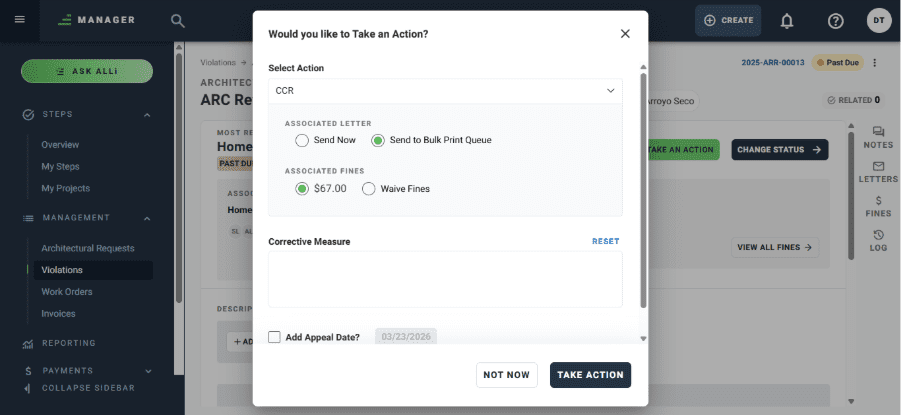
Managers and Administrators can now send Architectural Request and Violation letters to a centralized print queue, allowing all correspondence to be processed together in a single scheduled batch instead of sending each letter individually.
Feature Overview
The Bulk Print Queue introduces a streamlined way to manage letter generation across Architectural Requests and Violations. Wherever a letter can currently be generated, users will now see two options: Print Now and Send to Bulk Print. Choosing the latter stores a fully generated, print-ready letter in a centralized queue tied to the management company.
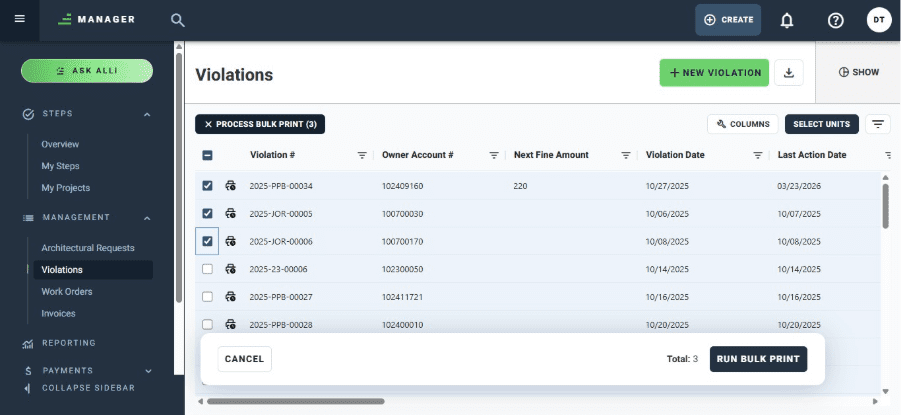
The Violations and Architectural Requests list views now include a Bulk Print mode that filters all items with letters queued for processing, allowing users to:
- Select one or multiple queued items and process them as a single batch.
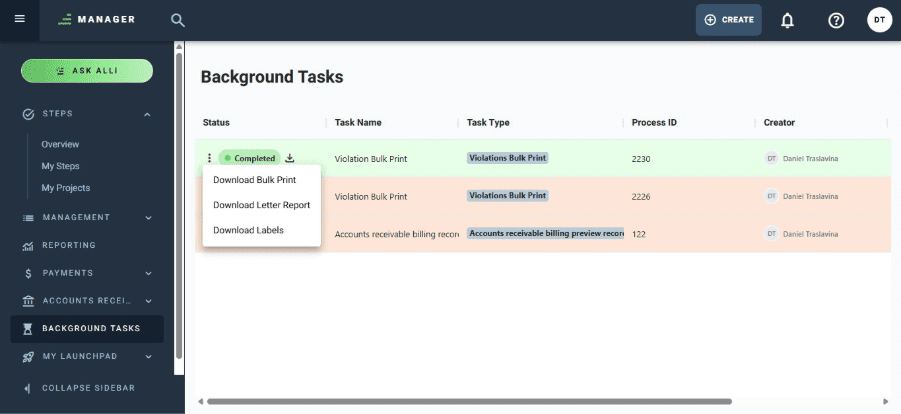
- Monitor progress via background tasks and download the results once the job is complete. Background tasks have been updated to surface Bulk Print jobs alongside other async processes, with type filtering available to quickly locate items.
Bulk print jobs run asynchronously, so users can continue working while files are generated. The way each letter is delivered depends on how email delivery is configured for Architectural Requests and Violations for each homeowner — physical, electronic, or both. Letters sent physically include the generation of printable mailing labels. Letters sent electronically are delivered via email. Once the batch is complete, a results report is generated summarizing the outcome of the process. All generated files are stored in the history of the corresponding item (Architectural Request, Violation, etc.).
This feature is available on web and mobile.
- Chronological list view with timestamps, author details, and file attachments.
Community Contacts:
- Client Contacts: Displays contact name, title, membership, email, phone, and date range. Expired contacts are indicated with a count badge.
- Vendor Contacts: Lists vendor name, contact name, email, and phone number.
Benefits:
- Centralized Visibility: All critical info in one place.
- Reduced Navigation: Fewer clicks to access what matters.
- Operational Efficiency: Quick access to support daily community management tasks.
Benefits
- Scheduled Mail Processing: Managers and Administrators can batch all outgoing physical letters and print them on a dedicated day, eliminating the need to print each letter as it is generated.
- Centralized Queue Management: A single queue view consolidates all pending letters across Architectural Requests and Violations, giving users full visibility into what is waiting to be printed.
- Non-Blocking Workflow: Because print jobs run as background tasks, users are free to continue their work without waiting for files to generate. A results report is generated automatically once the batch is complete.
- Flexible Delivery: Each letter is processed according to the homeowner’s configured delivery preference — physical mail, electronic, or both — ensuring correspondence is sent through the right channel every time.
- Mailing Labels Included: For letters sent physically, printable mailing labels are generated as part of the batch, streamlining the entire physical mail preparation process.
- Full Audit Trail: All generated and printed files are saved to the history of each corresponding item, ensuring a complete and traceable record of all correspondence.
December 15th, 2025
What’s New:
Expanded Community Landing Page Information Modules
We’ve added new read-only modules to the Community Landing and Detail Pages, designed to centralize key community information and enhance visibility.
Overview Tab:
- Fact Sheet: Displays structured community data using field codes and values for quick reference.
- Billing Records: Lists all active billing items, including name, start/end dates, amount, frequency, type, and posting day.
Records Tab:
- CC&Rs: Provides a read-only view of Covenants, Conditions, and Restrictions.
- Documents: Shows uploaded community files with metadata like name, upload time, file size, and download option (read-only view).
Community Notes
- Chronological list view with timestamps, author details, and file attachments.
Community Contacts:
- Client Contacts: Displays contact name, title, membership, email, phone, and date range. Expired contacts are indicated with a count badge.
- Vendor Contacts: Lists vendor name, contact name, email, and phone number.
Benefits:
- Centralized Visibility: All critical info in one place.
- Reduced Navigation: Fewer clicks to access what matters.
- Operational Efficiency: Quick access to support daily community management tasks.
December 3rd, 2025
What’s New?
Payments Integrated in Manager
All Payments functionality is now built directly into the Manager experience, so users no longer need to navigate to the separate Payments product.
Feature Overview:
Users can access the full Payments toolset inside Suite Manager. This consolidates workflows and removes the need to switch products to complete payment-related tasks.
Benefits:
- Single Experience: Payments tasks can be completed without leaving Manager.
- Less Context Switching: Eliminates the extra step of opening the standalone Payments product.
Community Landing Page / Community Detail Page Improvements
The Community Landing Page and Community Detail Page now include ongoing improvements through newly added modules.
Feature Overview:
Each new module added to the Community Detail Page is part of this release, enhancing the community landing/detail experience and making key information easier to access in one place. As part of this update, we introduced the new Metrics Tab, which includes blocks with item counters (Violations, ARCs, Work Orders, Invoices, Delinquencies) that highlight items requiring accelerated or urgent action from CAMs. Clicking any of these counters takes users directly to the filtered list view of those items, enabling immediate action.
The Metrics Tab also includes two additional sections: one displaying the list of active standalone steps related to the community, and another showing Violations or Work Orders that have moved to Past Due.
Benefits:
- Richer Community View: More information and tools surfaced directly on the landing/detail pages.
- Better Navigation: Modules bring frequently used community context closer to the user.
Step Projects Enhancements: Search + Related Links
Improvements related to Step Projects were introduced. From now on, the search bar allows users to search for Step Projects, and it is now possible to add Related Links to Step Projects, just as it already works for regular Steps.
Feature Overview:
Users can now:
- Search for Projects directly within Suite Manager.
- Add Related Links to Projects (previously only supported for Steps).
This makes it easier to connect supporting content and cross-reference work.
Benefits:
- Faster Project Discovery: Find projects quickly via search.
- Stronger Context Linking: Related links extend knowledge and references beyond Steps into Projects.
November 18th, 2025
What’s New?
Processing Invoices: Approving & Rejecting
You can now approve or reject invoices directly within Suite Manager, streamlining how communities review and act on incoming financial documents.
Feature Overview
This new enhancement introduces the ability for authorized users to approve or reject invoices from within the Invoices workflow. Each invoice record now includes clear action buttons, visual status indicators, and contextual messages that guide users through the decision-making process.
The new workflow supports roles responsible for financial operations, vendor management, and billing review. All actions are stored for audit purposes and integrate with existing ledger and reporting flows.
This feature is available in the web application.
Benefits:
- Faster Financial Decisions: Eliminates back-and-forth emails by allowing decisions directly in the system.
- Improved Accountability: Approval and rejection actions are logged for transparency and auditing.
- Streamlined Operations: Reduces processing time for invoices and improves workflow efficiency for management teams.
Standard Search (Free-Tier Search Experience)
A new, non-AI search option gives all users access to fast, reliable keyword-based search throughout Suite Manager.
Feature Overview
The new Standard Search provides a simplified search experience across communities, records, and operational data without relying on AI. Users can enter keywords and navigate directly to the content they need—perfect for customers who prefer deterministic results or operate in environments where AI search is not enabled.
This update ensures broad search capability across the platform while reserving more advanced, AI-powered Omnisearch capabilities for premium tiers.
Benefits:
- Universal Availability: Ensures every Suite Manager customer has access to essential search capabilities.
- Predictable Results: Offers clean, consistent keyword matching without AI interpretation.
- Improved Navigation: Helps users move more quickly through common records and workflows.
Community Landing Page
A redesigned, read-only Community Landing Page centralizes vital community information in a modern, structured layout.
Feature Overview
The new Community Landing Page introduces a modular, intuitive design built around four read-only components:
- Fact Sheet: Core details such as name, address, identifiers, and community attributes.
- Client Contacts: Key representatives and their roles for operational coordination.
- Documents: Access to relevant governing and operational documents.
- CC&Rs: Quick visibility into Covenants, Conditions & Restrictions associated with the community.
This redesign improves clarity and supports upcoming enhancements such as editing, deeper navigation, and integrated community insights.
Benefits:
- Centralized Information Hub: Gives users a single, unified location to review community details.
- Improved Clarity & Layout: Modernizes the experience, reducing the need to navigate multiple modules.
- Future-Ready: Establishes the structural foundation for enhancements planned for early 2026.
What’s Improved
More Accurate Violation Dates
Violation created dates now display consistently across the interface, ensuring more reliable compliance reviews.
Improved Unit Selection Behavior
Checkboxes on unit selection screens behave more predictably, ensuring that selections stay in sync with user actions.
Cleaner Dropdown Behavior
Dropdown menus now properly reset when navigating between records, preventing incorrect or lingering values.
Clearer Assess-Now Feedback
Assess-Now actions in Violations now provide consistent visual feedback, reducing confusion when managing fines or compliance events.
More Reliable Violation Processing
Updates to backend logic improve the accuracy and stability of Violation actions, including assessing violations and generating letters in complex scenarios.
November 3rd, 2025
What’s New?
Violation Management Enhancements
Community Managers now have more control and flexibility when managing violation communications and workflows.
Feature Overview:
Several updates improve how violation letters and fines are generated, sent, and tracked in Suite Manager. Managers can now send letters immediately using a new Send Now button in the Associated Letter section, or easily Resend and Regenerate letters as needed. Additional workflow updates allow users to manually advance violations to the next step, update appeal dates, and experience a refreshed interface with clearer text labels and improved layout consistency.
- Greater Control: Take immediate action on violation letters without waiting for automated triggers.
- Efficiency Gains: Quickly correct or resend correspondence directly from the violation record.
- Improved Clarity: Updated labels and design elements make managing violation stages easier and faster.
What’s Improved
Reporting Reliability
Lots of bug fixes to ensure reports display data consistently without blank or missing results.
Previous Behavior:
Users occasionally encountered empty states after running a report, requiring manual refresh to view results.
Resolution:
The reporting service now automatically refreshes Recently Run Reports upon completion, ensuring data loads correctly every time.
Benefit:
Users always see current and complete report results without extra steps or confusion.
Invoice and Billing Accuracy
Financial data now calculates and displays correctly throughout billing workflows.
Previous Behavior:
Invoice amounts occasionally lost decimal precision, and batch totals sometimes displayed incorrect values.
Resolution:
Both invoice calculation and batch summary logic have been corrected to ensure accuracy in all billing displays.
Benefit:
Provides accountants and managers with trustworthy financial data, minimizing manual corrections.
October 6th, 2025
Version: 0.1.948
Create Violations
Easily log new violations from within Suite Manager and ensure consistent tracking across communities.
Feature Overview:
Community Managers can now create new violations directly from the Violations List or Property detail page. When creating a violation, users can select a category, define the violation item, capture violation and inspection dates, and attach photos or descriptions for context. The system automatically associates the violation with the correct homeowner, address, and community, ensuring accurate recordkeeping from the start.
Once created, violations appear instantly in the list view and can be linked to related Steps, ARCs, or Work Orders via Omnisearch.
Benefits:
- Faster Data Entry: Streamlines the violation logging process by eliminating extra steps.
- Improved Accuracy: Automatically links violations to the correct property and homeowner.
- Better Recordkeeping: Allows users to include photos and detailed descriptions up front.
Update Violations
Maintain complete, accurate records with editable violation details and supporting attachments.
Feature Overview:
The new Violation Detail Page gives Managers and Admins full visibility into a violation’s lifecycle and provides tools to update details as needed. Users can:
- Edit the description and corrective measure (Required Action) fields.
- Add or remove photos and captions.
- Manage appeal dates, inspection data, and inspector assignments.
- Track letters, fines, and notes in separate tabs for clarity.
All updates are captured in the audit log, so users can see who made changes and when.
Benefits:
- Transparency: Every update is tracked for full accountability.
- Efficiency: Makes it easy to modify details without switching screens.
- Comprehensive View: Combines letters, fines, and notes into one unified interface.
Advance Violations Through the Process
Move violations seamlessly through the full compliance workflow—from open to resolution.
Feature Overview:
Suite Manager now supports a guided violation workflow that mirrors Caliber’s established process. Users can advance a violation through three key stages: Open → Monitored → Closed, applying required actions and sending letters along the way.
Each action step supports:
- Selecting and sending letter templates.
- Editing or reprinting letters as needed.
- Applying, waiving, or locking fines.
- Updating Follow-Up By dates with validation.
- Adding or updating the Corrective Measure (Required Action).
What’s Improved
Violation Management Experience
Enhanced reliability and user experience when managing violations.
Previous Behavior:
Users needed to switch between multiple Caliber modules to track or update violation details. Letter sending, fines, and corrective actions were managed in separate views, creating friction and slowing compliance work.
Resolution:
The new Violation Detail Page consolidates all functions, creation, updates, and advancement, into a single, intuitive screen. Users can now view status, send letters, assess fines, and update required actions without leaving the page.
Benefit:
A unified, modern interface that speeds up compliance workflows and provides a clearer picture of each violation’s history.
September 17th, 2025
Version: Suite Manager Web - Production
What’s New?
Enhanced Violation Management
Managers now have greater flexibility to update and advance violations directly within Suite Manager.
Feature Overview:
The Violations module has been expanded to allow full editing and management in one place.
Users can now:
- Add or edit violation descriptions
- Change status, inspector, violation date/time, and appeal date
- Upload single or multiple photos
- Add/edit photo captions, update, delete, and download photos
- View fines associated with a violation
These changes streamline the violation lifecycle, enabling staff to update cases quickly without switching tools.
Benefits:
- Time Savings: Manage all aspects of a violation in a single location.
- Flexibility: Update details and supporting photos as a case progresses.
- Transparency: Provide clear documentation of violations and related fines.
Group Reporting
Introducing a new way to run multiple reports at once and access recent reporting history.
Feature Overview:
The Reports page now features a tabbed layout separating Group Reports from Single-Client Reports. Users can:
Not all reports are available in group format yet — additional report types will be added in future releases.
Benefits:
- Efficiency: Run and review multiple reports in a single action.
- Organization: Clear separation between group and individual reports.
- Convenience: Quickly access recently generated report groups.
Architectural Notes Email Notifications
Managers can now send email notifications when adding a note to an architectural request, improving communication with homeowners and reviewers.
Feature Overview:
When creating a new note on an architectural request, managers can set visibility (Everyone, Managers & Reviewers, or Managers Only). Depending on visibility, optional checkboxes allow sending notifications to:
- ARC Committee members (reviewers/board)
- Homeowners linked to the request
Emails include note details (date, author, content) as well as request details (application number, type, association name, address, and a link). All notification actions are recorded in the request’s Actions/Notifications tab for tracking.
Benefits:
- Improved Communication: Homeowners and board members receive timely updates on ARC notes.
- Accountability: Notifications are logged for transparency and recordkeeping.
- Flexibility: Managers choose who sees notes and who gets notified.
FRONTSTEPS
Caliber
September 24th, 2026
Version 6.00.04
What’s New?
A Full Application Upgrade for Every Caliber User
Moving FRONTSTEPS Caliber to 64-bit is a major milestone, and it’s more than a platform upgrade. It represents a significant investment in Caliber’s foundation and readiness for what’s next. But we didn’t stop there.
Built Around Your Feedback
We listened to what you told us. While our engineering team was focused on the 64-bit upgrade, engineers across FRONTSTEPS also worked on specific customer-reported issues and improvements to address the things that matter most to you.
- Your feedback drove the work: We used your requests and real-world experiences to help guide what we improved.
- More improvements, delivered faster: New AI-assisted development tools let our engineers move through this work faster than ever, with every change still built, reviewed, and tested by our team.
- Focused on your experience: Over 60 fixes and improvements ship in this release, the largest set we’ve ever delivered at once.
- You’ll see the difference: If you’ve reported an issue that was addressed as part of this work, our support team will be reaching out to let you know about the improvement.
Open Manager Right from Caliber
Do what you already do in Caliber, in a more modern web experience — Manager.
Feature Overview
Click the Manager button in the top right of the Caliber menu to jump straight into FRONTSTEPS Manager, which opens in your web browser. Sign in once and pick up right where you left off.
Send Delinquency Letters and Statements to HOA Mailers
You can now collate delinquency letters and statements with HOA Mailers as the print Third Party Printer Setting.
You can now collate delinquency letters and statements with HOA Mailers as the print Third Party Printer Setting.
Benefits
- Less Manual Work: Delinquency letters and statements are automatically collated and sent to HOA Mailers for hard-copy printing and mailing.
July 23rd, 2026
Version 5.91.32
What’s New?
Build Board-Ready Budgets with ALLi
Just in time for budget season — Community Managers can now create annual operating budgets through a guided, AI-assisted experience in FRONTSTEPS Manager, powered by ALLi.
Feature Overview
ALLi Budget Studio brings together Caliber financial data, validated budgeting assumptions, and account-level recommendations in one guided workflow. Managers can review a traceable baseline budget alongside ALLi’s recommended adjustments, apply or undo changes, and export a board-ready Excel workbook with live formulas and a populated Caliber Import tab.
Benefits:
- Faster Budget Preparation: Complete the budgeting process in one guided workflow instead of exporting data and rebuilding spreadsheets for each community.
- Accurate, Traceable Results: Proposed values are tied to Caliber data, budgeting assumptions, supporting schedules, or Manager overrides.
- Smarter Recommendations: ALLi provides account-level recommendations supported by relevant source information, reasoning, confidence, and estimated financial impact.
- Full Manager Control: Recommendations are never applied automatically. Managers choose which changes to accept and can undo them at any time.
- Board-Ready Output: Export a clean Excel workbook with live formulas and an automatically populated Caliber Import tab.
ALLi Pro customers can access ALLi Budget Studio directly in FRONTSTEPS Manager. Clients interested in adding ALLi can request a demo.
Available by Request: Caliber 64-Bit Upgrade
The 64-bit version of Caliber is now available by request, providing improved stability and greater support for large databases and long-running processes.
Feature Overview
The Caliber 64-bit upgrade improves application stability, reduces memory-related errors, and enhances support for large databases and long-running processes.
To learn more or request an upgrade, contact [email protected].
Automate Banking with Wintrust Integration
Wintrust customers can now automate statement retrieval and account reconciliation while viewing real-time balances directly within Caliber.
Feature Overview
Caliber’s advanced banking integration now supports Wintrust Bank. Communities that bank with Wintrust can automatically retrieve statements, configure automated account reconciliation, and view real-time account balances from the Chart of Accounts and Advanced Automation—without logging into a separate banking portal.
Benefits:
- Automated Statement Retrieval: Wintrust bank statements are retrieved automatically and available for viewing directly from the Chart of Accounts.
- Streamlined Reconciliation: Select Wintrust as the provider for automated reconciliation tasks, reducing the need for manual transaction imports.
- Real-Time Balance Visibility: View up-to-date Wintrust account balances directly in Caliber Desktop without accessing a separate banking portal.
Simplify Investment Management with HOA Invest Enhancements
Two enhancements to the HOA Invest integration provide faster reconciliation and easier access to investment account documentation.
Feature Overview
This release adds automated reconciliation for HOA Invest accounts and the ability to view and download fixed income reports alongside bank statements.
Benefits:
- Automated Reconciliation: Configure HOA Invest accounts for automated reconciliation using the same streamlined workflow available for other integrated banks.
- Centralized Reporting: View and download fixed income reports directly from the Chart of Accounts alongside existing bank statements.
June 25th, 2026
Version 5.90.11
What’s New?
Advanced Automation Improvements
Scheduled background jobs in Advanced Automation now run independently of one another, ensuring that a
long-running process for one community no longer delays jobs for others – scheduled jobs should no longer be
skipped or delayed.
Feature Overview
Advanced Automation has been updated so that background jobs will run independently and concurrently. This will
improve the predictability and stability of critical jobs like lockbox and AP Automation.
Benefits:
- No more blocked jobs: Communities with time-sensitive automated tasks — such as lockbox processing or AP
payments — will see those jobs execute reliably on their configured schedules, even if another community’s job
is running simultaneously. - Improved reliability: Scheduled jobs that previously appeared to be silently skipped or missed will now fire as
expected, reducing the need for manual intervention and support escalations. - Predictable performance: Advanced Automation will provide consistent, on-time execution across all customers
and job types
Accounts Payable (AP) – Closed Period Protection
(Edenred & Avid customers)
Caliber now provides clear, actionable feedback when invoices or payments are submitted to a closed
accounting period via the API from our AP partners, preventing silent failures and helping teams resolve
posting issues quickly.
Feature Overview
When integrated AP systems (such as Edenred or Avid) submit invoices or payments via the Caliber API, it is possible for
a transaction to reference a period that has already been closed in Caliber’s accounting records. Previously, this could
result in unexpected behavior without clear guidance on what happened or how to resolve it.
This release introduces explicit handling for closed-period submissions:
- Invoices submitted to a closed period: When an invoice is posted via the API to a closed accounting period
and the client is on accrual accounting, Caliber will place the invoice on HOLD, record the original posting
intent in the invoice log (including the attempted GL date). This preserves the invoice for review without
corrupting the accounting period. - New alert — Invoice Posted to Closed Period: Users can subscribe to a new system alert to be notified
when this occurs. The alert includes the invoice number and the attempted posting date, and clicking the alert
navigates directly to the invoice for quick resolution. - Payments submitted to a closed period: When a payment is posted via the API to a closed period, Caliber
will now return a clear error response — “Cannot post the payment to a closed period” — to the payment
partner and generate a separate alert advising staff to address the transaction in Caliber or coordinate with
their AP provider to avoid an out-of-balance condition.
Benefits:
- Clear visibility into posting exceptions
- Accounting integrity: Invoices are held rather than silently posted to closed periods, keeping financial records
clean and auditable. - Faster resolution: Direct links from alerts to the affected invoice reduce the time it takes to identify and resolve
closed-period posting exceptions
December 17th, 2025
Version 5.84
What’s New?
Exciting New Features in FRONTSTEPS Manager
Remember that you can click the “Manager” button to explore these new features in addition to easily
managing architecture, violations, and work orders in an enhanced web experience!
- Payments in Manager
The FS Pay Dashboard is now integrated into Manager, giving CAMs and authorized teams direct access
to homeowner payment and balance details. Answer payment questions in real time, reduce system
switching, and support homeowners faster during peak payment season. - Unit Detail Page
Search for any unit and open the Unit Detail Page to view a summary of unit health, open violations,
architectural requests, work orders, delinquencies, contact info, and notes, all designed to surface
actionable insights at a glance. - Community Detail Page
Search for any community and open the Community Detail Page to view fact sheets, billing items,
CC&Rs, documents, and contact lists. See a clear snapshot of community health and address
outstanding or time-sensitive needs with fewer clicks.
November 11th, 2025
Version 5.82
What’s New?
New Delinquency Fee Option: “Lowest Fee”
You can now configure delinquency fees to automatically apply the lower of two fee types—making compliance even easier.
We’ve added a new configuration option for delinquency fees! You can now choose to apply the lesser of either a flat fee (fixed dollar amount) or a percentage of the late amount. This enhancement supports compliance needs in jurisdictions where fee limits vary, giving you more flexibility and control.
September 23rd, 2025
Version 5.81
What’s New?
Architectural Notes – Notifications
Homeowners and architectural committee members can now be notified when a new note is added to an architectural request!
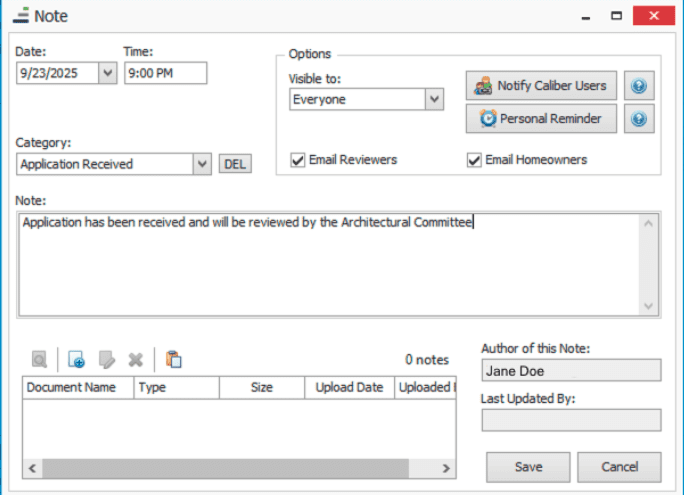
When adding a note to an architectural request, users will now have the option to send an email notification to either architectural committee members, homeowners, or both. The email includes the note’s contents and key details about the request, sent to the recipient’s primary email address.
This feature will streamline communication to all parties involved in the architectural process, making it more efficient and transparent. We’ve also added a new visibility dropdown, clearly indicating whether a note is visible to everyone, managers and reviewers, or only managers.
August 21st, 2025
Version 5.80
Announcing Our Partnership with TechCollect
FRONTSTEPS has just made AR recovery faster, simpler, and more compassionate with our partnership with TechCollect!
With the new Free Trial Integration with TechCollect, you can now launch a free trial directly from your FRONTSTEPS dashboard. No extra logins, no setup delays. Look for the TechCollect button in the upper right of the Caliber screen!
This integration combines FRONTSTEPS’ all-in-one community management platform with TechCollect’s AI-powered AR recovery tools, giving you:
- Faster recovery without extra labor
- Predictive insights on which accounts will pay and when
- Fewer legal referrals and lower legal costs
Architectural Report Enhancements
New options have been added to the Architectural reports in the Client Reporting Toolbox and Report Groups:
- New Date filters when running from the Client Reporting Toolbox
- Option to choose to ignore date ranges when running the reports as part of a report group.
- Option to sort reports by date in ascending or descending order.
June 26th, 2025
Version 5.78
What’s New?
Delinquency – Split Report by Community
When running delinquency, users will now have an option to insert page breaks between clients when printing the report, which will make it easier to share delinquency information with your communities.
API Access Management Update
To better support and scale the FRONTSTEPS Caliber API, a below-industry-standard access fee for third-party vendors was introduced on January 1, 2025. As part of this enhancement, direct creation and management of API user accounts is now handled by our Customer Support team. FRONTSTEPS Caliber customers using the API for internal purposes will not incur any charges.
If you’re working with a third-party vendor or integration that requires API access, please contact [email protected] to ensure proper onboarding and alignment with our API access expectations. Most vendors recognize the added value this access brings and are not passing associated costs on to our mutual customers.
May 21st, 2025
Version 5.77
What’s New?
Improved Credential Management for AP Automation
For customers of First Citizens Bank VendorPay and for our Edenred Pay customers – we’ve improved the management of API credentials. The new process will no longer require the customer to update their credentials in Caliber even after they have expired in Edenred Pay.
What’s Improved?
Report Cover Sheet – Field Codes
Resolved an issue where client field codes were not properly populating in Report Cover Sheet templates.
April 24th, 2025
Version 5.76
What’s New?
- High priority bug fixes
- Improvements to AP Automation
- For customers in our Corporate Accounting Beta program: We’ve added the ability to enter charges directly within Caliber. Keep track of copies, mailings, and other miscellaneous charges in Caliber. Review and post charges directly to your customer’s AP!
March 20th, 2025
Version 5.75
What’s New?
Enhanced Architecture Notifications
We’ve added the capability of creating a custom message when sending notification emails to board members and homeowners upon completion of an architectural step.
Additional features of this enhancement include:
- Notifications can be configured at the Master or Client level
- Custom messages will support architectural fields codes and enhanced formatting
- If a custom message is not specified, the current notification text will be used instead.
- For all notifications, we’ve appended critical information for the item at the end of the message, including application number, request type, community name, unit address, and a link to the architectural item in FRONTSTEPS Community.
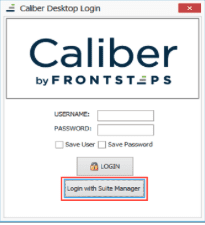
What’s Improved?
Client Dashboard – Notes Report
We’ve improved the Notes report when running from the Client Dashboard. It will now preserve the formatting of the notes so that line breaks are retained and the content of the notes is more legible within the report.
Febuary 20th, 2025
Version 5.74
January 23rd, 2025
Version 5.73
What’s New?
Login to Caliber with Suite Manager
For Suite Manager users, you will now have the option to login to Caliber with your Suite Manager credentials. This method of authentication will allow you to seamlessly transition from Caliber to Suite Manager in your day-to-day activities.
FRONTSTEPS
Community
August 31st, 2026
Web Portal Version 8.20.2026
What’s Improved
Architectural Review (ARC) Request Syncing
Architectural review requests now sync more reliably from Caliber into FRONTSTEPS.
Previous Behavior:
In some communities, architectural review (ARC) requests that were visible and active in Caliber did not appear in FRONTSTEPS. Managers and board members were unable to locate, review, approve, or deny these requests through their normal FRONTSTEPS workflow, even after waiting for the regular sync to complete.
Resolution:
The underlying syncing issue has been addressed so active architectural requests from Caliber display correctly in FRONTSTEPS. Managers, board members, and ARC reviewers can now view and process these requests as expected.
Approval Requests
Creating an approval request with certain board members no longer produces an error.
Previous Behavior:
When creating an Approval Board request and adding specific board members, some users would see an error rather than being able to save the request, blocking that approval workflow for the affected community.
Resolution:
The error has been resolved so approval requests can be created and saved successfully regardless of which registered board members are added.
Violations Status Filter
The “All Statuses” filter on the Violations list now shows a complete result set on first load.
Previous Behavior:
When viewing Violations with the status filter set to “All Statuses,” closed violations were missing from the results until a user manually switched the filter to “Closed” and then back to “All Statuses.”
Resolution:
The “All Statuses” filter now returns the complete list, including closed violations, without requiring any extra filter toggling.
Admin Portal Manager List Sorting
The manager list in Manage Communities now sorts consistently.
Previous Behavior:
When adding managers in Manage Communities, the available user list would fluctuate between alphabetical order and an inconsistent, unpredictable order — most noticeably right after adding a manager.
Resolution:
The manager list now sorts consistently, making it easier for admins to find and select the right manager.
August 20th, 2026
Web Portal Version 8.20.2026
What’s New?
Board Membership Segmentation for Campaigns
Target campaign messages to board members, non-board members, or everyone, right alongside your other audience filters.
Feature Overview:
When building a campaign, managers can now filter the recipient list by board membership. A new Board Segmentation control sits alongside existing audience filters and works the same way: leave it on Ignore to include everyone, or narrow it to Board Members only or Non-Board Members only. It combines with other segmentation rules, so a manager can, for example, target only board members who are registered. Available on web.
All segmentation, including this new option, is opt-in. Existing campaigns are unaffected and continue sending to their current audience until a manager explicitly opts in and applies Board Segmentation to that campaign.
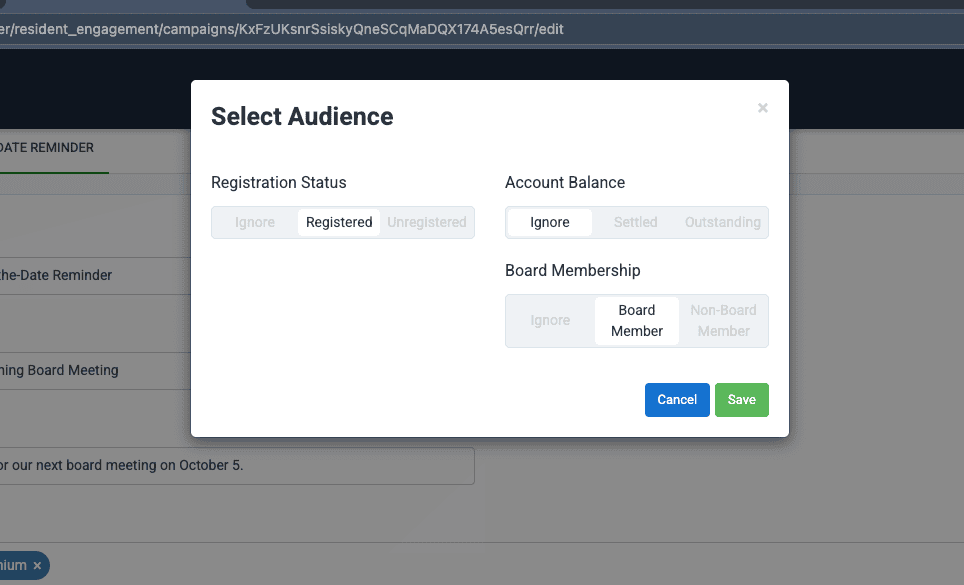
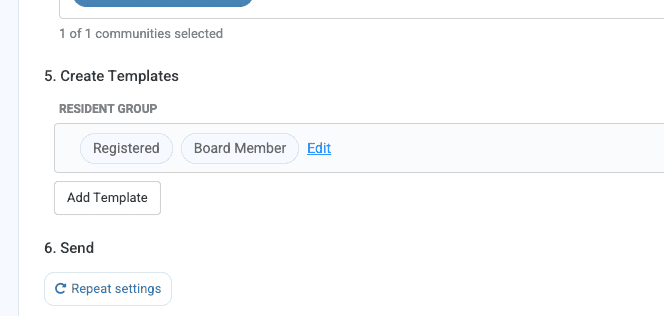
Benefits:
- More precise outreach: Send board-specific or resident-specific communications without manually building or excluding a recipient list.
- Works with existing filters: Combine board membership with registered vs. unregistered status (or other segmentation) for tightly targeted campaigns.
Restrict Portal Access for Homeowners in Collections
Management companies can now fully restrict portal login for homeowners whose account is in collections, not just hide their balance.
Feature Overview:
Previously, a setting could hide payment balance information from homeowners in collections, but those homeowners could still log into the resident portal and view their payment history. This release introduces a new, separate configuration so, when enabled, homeowners in collections status cannot log into the portal at all, and the account history download is also hidden. This does not change the behavior of the existing balance-hiding setting — it’s an additional option. This new configuration is not self-serve; if you’re interested in enabling it for your communities, please reach out to your Customer Success Manager or our Support team.
Benefits:
- Consistent enforcement: The restriction applies across every login method, not just the standard sign-in form.
- Matches collections policy: Gives management companies a portal-access control that lines up with how they already handle in-collections accounts, instead of requiring manual account suspension.
What’s Improved
Fewer Error Pages Across Sign-In, Profile Updates, and Community Links
Several everyday actions that used to show a generic error page now behave the way they were always supposed to.
Previous Behavior:
In a handful of specific situations — including certain sign-in links, account detail updates, and community links — users could occasionally see a generic error page instead of the expected result.
Resolution:
We fixed the underlying issue in each of these paths, so users now land on the expected page instead of an error.
August 18th, 2026
Web Portal Version 8.18.2026
What’s New?
What’s Improved
Owners With Outstanding Balances No Longer Missed by Resident Engagement Campaigns
Resident Engagement’s “Account Balance Outstanding” campaigns now reach every eligible owner, and any owner who still can’t be matched is called out by name instead of silently skipped.
Previous Behavior: Units that were added to Community before being connected to the accounting system were missing a piece of data used to match an owner to their account balance. Resident Engagement’s “Account Balance Outstanding” audience could not match these owners, so they were left out of the campaign with no indication anything was missing.
Resolution: FRONTSTEPS Support can now quickly correct this missing data for an entire community, and any owner who still can’t be matched is named in the campaign’s event log instead of disappearing without explanation. If owners with outstanding balances never seem to receive these campaigns, reach out to Support so this can be checked.
Violation Correction Emails Now Link Managers to the Right Page
The “View Violation” link in a Violation Correction Notification now takes each recipient to a page they can actually open.
Previous Behavior: When a homeowner added a note and checked “Correct Violation,” a Violation Correction Notification was sent to both managers and board members with the same link — one that only board members could open. Managers who clicked it were left on the login page or a page that never loaded, with no way to reach the violation.
Resolution: The link is now built for the recipient’s role. Managers are sent to the violations page they’re permitted to view, and board members continue to receive the same violation detail page as before. A manager who is already signed in goes straight to the violation from the email. The “View Violation” button text, previously truncated in the email, now displays correctly as well.
Campaign Metrics for Imported-Recipient Campaigns
Campaigns sent to an imported recipient list now report their email metrics instead of showing “No data found.”
Previous Behavior: A campaign built from an imported recipient list delivered its emails successfully, but the Emails tab under Review Metrics showed “No data found” and “No emails found matching your criteria,” even though the emails had gone out.
Resolution: Email activity is now recorded for imported-recipient campaigns, and delivery, open, and bounce updates are matched back to each send by email address. The Emails tab now lists each imported send with its email address, template, status, and timestamp. Campaigns sent to residents are unchanged.
August 11th, 2026
Web Portal Version 8.11.2026
What’s New?
Clearer Messaging for Residents Who Already Have an Invitation
Residents who try to self-register when their management company has already invited them now see that an invitation is waiting, and that invitation is automatically resent.
Feature Overview:
Community previously treated two different situations as the same thing. A resident who had been invited by their management company but had not yet accepted, and a resident who had submitted their own access request, both received the message “You have already requested access, please check your email for confirmation.”
That message was wrong for invited residents — they had not requested anything — and left them with no way to move forward. The two states are now handled separately:
- Invited, not yet accepted. The resident is told an invitation has already been sent and that they need to accept it, and the invitation email is automatically resent so they have a current link.
- Self-requested access. The resident continues to see the existing already-requested confirmation message.
Applies to resident self-registration on the web.
Benefits:
- Residents are not misled: Invited residents are no longer told they requested access themselves.
- No support ticket required: The invitation is resent automatically instead of the resident needing to ask someone to send it again.
- Registration can be completed: The resident is pointed at the action that actually unblocks them.
What’s Improved
Email Metrics Now Match Email History
Campaign metrics report the number of emails actually sent, matching the campaign’s Email History.
Previous Behavior: Campaign metrics could disagree with a campaign’s own Email History about how many emails were sent, and the Overview tab and the Emails tab could disagree with each other. Managers reviewing Resident Engagement campaign performance could not always trust the sent count.
Resolution: Emails Sent is now counted the same way everywhere a campaign reports it, from the record created when each email is sent rather than from delivery notifications that can arrive late, arrive twice, or not arrive at all. The Overview tab, the Emails tab, and Email History now agree. Open, click, and bounce rates are unchanged.
Screen Reader Access to Resident Engagement Dialogs
The Select Communities, Audience Selection, and Recurrence dialogs are now available to screen readers.
Previous Behavior: The three Resident Engagement campaign dialogs were hidden from assistive technology even while open and visible on screen. A screen reader user could tab into the dialog but nothing about it — that it had opened, or what its controls were — was ever announced.
Resolution: The dialogs are now identified as modal dialogs and exposed to assistive technology while open, so a screen reader announces the dialog and its controls (search, community checkboxes, Cancel, Apply) as they’re reached. There is no change to how the dialogs behave for anyone else.
Fewer Error Pages Across Accounting and Community Records
A single bad record or a temporary accounting-system outage no longer replaces an entire page with a generic error.
Previous Behavior: Several situations across Architectural Requests, Financials, Work Orders, and accounting document downloads and previews could replace an entire page with a generic error instead of showing the rest of a manager’s or owner’s information.
Resolution: Each of these now fails in place instead of taking the page down: an unreadable date shows as an empty value in that one field, a document that can’t be displayed is listed by name with a note, and a failed download or preview returns the user to the page with a message instead of an error page. This coverage now extends across accounting-related actions in violations, work orders, common-area work orders, architectural requests, invoices, financials, and folders.
August 5th, 2026
Web Portal Version 8.05.2026
What’s New?
Architectural Request Signature Step Completes
Homeowners can complete Step 5 of 5 and submit an Architectural Request.
Previous Behavior: On rare occasions, homeowners reached the final signature step of an Architectural Request, entered a signature, checked the agreement box, selected Sign and submit, and the submission failed with a server error. Steps 1 through 4 completed normally.
Resolution: Signature submission failures are now handled rather than returning a raw server error, so the request signs and submits.
Clean PDF Output for Architectural Requests With Checklist Items
PDFs generated from Architectural Requests that include checklist items no longer contain blank pages.
Previous Behavior: Generating a PDF from an enhanced Architectural Request containing at least one checklist item inserted unexpected blank pages into the document, making the output look incomplete and requiring manual cleanup before use.
Resolution: The blank pages are no longer generated. Checklist content still appears in full, and pagination and formatting for requests without checklist items are unchanged.
Accurate Board Member Vote Status on Architectural Requests
Per-member vote eligibility and status on Architectural Requests now reflect the correct board member.
Previous Behavior: Board and Architecture Review Committee members couldn’t tell whether their vote on an Architectural Request had actually gone through — their vote status always showed as not submitted, even after voting. This caused confusion about approval status and sometimes required a manager to step in and confirm votes manually.
Resolution: Each board or ARC member’s vote status and eligibility to vote is now correctly identified, so members can see the true status of their vote on an Architectural Request.
July 29th, 2026
Web Portal Version 7.29.26
What’s New?
Fewer Unexpected Portal Sign-Outs
Residents entering a high volume of records in rapid succession are no longer signed out mid-task.
Previous Behavior: A resident entering roughly 30 log entries in quick succession — pasting each from an external document — was unexpectedly signed out and received errors during data entry.
Resolution: Concurrent authentication token refreshes no longer force a sign-out, so rapid successive requests keep the session intact.
Suspended Manager Accounts Unsuspend Reliably
Unsuspending a manager account now reports its true result instead of showing a false success.
Previous Behavior: A manager attempting to unsuspend another manager’s account saw a success message, but the account remained suspended and did not appear under active users.
Resolution: The unsuspend action no longer reports success when the underlying save fails, so the outcome shown matches what actually happened to the account.
ARC Submissions Complete Successfully
Architectural Change Requests submit and leave Draft status as expected.
Previous Behavior: For a limited number of residents experiencing the issue, selecting Submit on a completed ARC form displayed a loading spinner and then returned to the form with no error message. The request stayed in Draft status.
Resolution: ARC submissions no longer fail silently; the request completes and moves out of Draft.
Executable File Uploads Blocked on ARC Attachments
Executable files can no longer be attached to an ARC request.
Previous Behavior: Any file type was accepted as an ARC attachment, including executable files, which can carry malware.
Resolution: Executable file uploads are rejected at the ARC attachment step.
Consistent PDF Document Previews
The “Document Preview Not Available” message now appears only when a preview genuinely cannot be shown.
Previous Behavior: Some PDFs rendered a preview while the “Document Preview Not Available” large-file message displayed at the same time. Other PDFs that were not large showed the same message with no preview.
Resolution: Preview banner and hidden-state no longer carry over from a previously opened document, so each PDF shows the correct message for itself.
eForm Dropdowns Start Blank
Dropdown fields on eForms no longer pre-select the first option.
Previous Behavior: Every dropdown on an eForm auto-selected its first option, which led users to assume no other choices were available.
Resolution: Required eForm dropdowns start blank and stay blank until the user chooses an option.
Spellcheck in the eForm Description Field
Spellcheck now works in the eForm Description field.
Previous Behavior: Misspelled words in the Description field of an eForm were not underlined and right-click spelling suggestions did not appear, though browser spellcheck worked normally elsewhere, including the title field.
Resolution: Spellcheck is enabled on the eForm Description field.
Resident Self-Registration Failure Prompt
The self-registration failure message no longer offers manager and administrator options.
Previous Behavior: When a resident’s self-registration attempt failed, the prompt displayed “Go to Login Page” and “Reset Password” buttons that linked to manager and administrator authentication pages.
Resolution: Those options are hidden when self-registration cannot be matched to a record. Residents see only the actions that apply to them.
Addresses and Units Display Within Groups
Groups with a large number of assigned units now list every address in the editable Addresses/Units area.
Previous Behavior: In an affected community, viewing a group showed the assigned units in the group but displayed nothing under Addresses/Units, so managers could not review or remove individual addresses.
Resolution: The Addresses/Units field populates for large groups, listing each selected address with a remove control.
July 27th, 2026
Web Portal Version 7.27.26
What’s New?
Company and My Campaigns Tabs
Resident Engagement now separates the campaigns you created from every campaign in the company, with expanded controls for owners and admins.
Feature Overview:
The Resident Engagement page in the Company Command Center now presents two tabs. My Campaigns is selected by default and lists only campaigns created by the current user, with full create, edit, update, and delete controls for every role, including company owners and admins. Campaigns lists every campaign in the company regardless of creator, including the user’s own, and adds a “Created By” column between the Communities and Status columns. Marketing admins who are not a company owner or admin have read-only access in the Campaigns tab with no action controls shown. Available on web.
Benefits:
- Faster access to your own work: My Campaigns opens by default so admins land on the campaigns they manage.
- Full company visibility: The Campaigns tab shows every campaign under the company, with the author identified.
- Clear separation: Personal campaign management and company-wide review live in distinct views.
Administrators and Company Owners Can Manage All Campaigns
Administrators and company owners can now edit and delete every campaign across the management company, regardless of who created it.
Feature Overview:
From the Campaigns tab, a company owner or administrator can select any campaign in the management company — including campaigns created by other users — and edit it, or delete it through the campaign actions with a required confirmation step. Cancelling the confirmation leaves the campaign unchanged. Users without owner or administrator rights do not see these controls. Available on web.
Benefits:
- No blocked work: Campaigns can be corrected or removed without waiting on the person who created them.
- Company-wide oversight: Owners and administrators manage every campaign under the management company from one place.
- Safeguarded: Deletion requires confirmation.
Full Visibility of Selected Campaign Communities
All communities selected for a campaign remain visible and removable, even when more than six are chosen.
Feature Overview:
The community selector on campaign create and edit no longer collapses additional selections into a non-expandable “1+” chip. Managers can review the complete list of selected recipient communities and remove any individual community, both while creating a campaign and when editing an existing one. Available on web.
Benefits:
- Verify before you send: The full recipient community list is reviewable at any point.
- Adjust in place: Each selected community can be removed individually.
Campaign Collision Warnings
Saving a campaign as active now warns you when its schedule overlaps another active campaign.
Feature Overview:
When a user saves or updates a campaign as active from My Campaigns, the system checks for an existing active campaign that overlaps in the same community or audience segment and displays a warning. The check runs on new active campaigns, on drafts promoted to active, and on already-active campaigns edited into an overlap. Saving or updating as a draft runs no check and shows no warning, since a draft is not scheduled to send. Available on web.
Benefits:
- Fewer duplicate sends: Overlapping communications are surfaced before the campaign goes active.
- Drafts stay frictionless: Work-in-progress campaigns save without interruption.
- Clear rule: The save action determines the status, and the status determines whether the check runs.
Disable and Delete Resident Engagement Campaigns
Campaigns can now be disabled or deleted to stop future emails while preserving campaign history and reporting data.
Feature Overview:
A “Disable Campaign” primary action stops all future emails for a campaign while keeping it visible in the UI with a disabled status; a matching “Enable Campaign” action restores it so sends resume per the campaign configuration. A “Delete Campaign” option in the actions dropdown removes the campaign from all campaign lists after a confirmation step, disables all scheduled and future emails, and retains the underlying data for reporting and audit purposes. Deleted campaigns cannot be re-enabled. Enable and Disable controls are visible only to users with Administrator Manager or Company Owner permission. Available on web.
Benefits:
- Stop sends without losing history: Disabling and deleting both preserve campaign data for reporting.
- Reversible by design: Disabled campaigns can be re-enabled at any time.
- Deliberate deletion: Delete sits in the actions dropdown behind a confirmation step.
- Accurate reporting: Campaigns sent before deletion retain their historical performance metrics.
What’s Improved?
Platform Reliability
Reduced Intermittent Errors and Logouts During Releases
We reduced intermittent errors and unexpected logouts across the portal through infrastructure changes.
Previous Behavior:
Users across multiple communities and user types intermittently encountered 500 Internal Server Errors and were unexpectedly logged out of the FRONTSTEPS Community portal.
Resolution:
Infrastructure changes were made to reduce these intermittent errors and logouts, resulting in a more stable, reliable experience across the portal. This area remains under active monitoring, and further adjustments will be made if needed.
December 1st, 2025
The Web Portal v2.2.81
What’s New?
Change of Invoice Interface for Board Members
Feature Overview:
This update allows board members to see invoices they need to provide votes/approvals for on a specific tab titled ‘Board Member’ and all invoices on the ‘Invoices’ Tab . This separation removes confusion on what approvals applies to (only board member approvals are counted for the approvals column) and maintains the previous functionality which allow board members to see past invoices.
Benefits:
- Clarity – Approvals and actions belong on their own tab and in a deliberate context for
greater user clarity
- Better Management of the Process – Board Members can see in a specific place the
invoices that need their attention
- Reduced Questions – Expectations and Requirements are now clear
What’s Improved?
Architectural Request File size updates
We have increased the file sizes for managers when upload documents for owners to review when submitting an Architectural Request. Owners also have a greater limit when uploading documents during the submission process.
Previous Behavior:
- Managers could only upload 5MB files with a total file size of 20MB
- Owners could only upload 20MB files on the web portal with a total size of 25MB
Rsolution:
-
Managers can upload 50MB files without a total file size restriction on the web portal
-
Owners can upload 50MB files without a total file size restriction on the web portal
Payments Call-to-Action Updated
We have updated the call-to-action on the payments button for greater clarity for owner users managing their finances
Previous Behavior:
-
Questions would impede owners from clicking ‘pay now’ to start the payment process
Resolution:
- Button has been updated to “Review & Make Payment” so owners understand clicking that button doesn’t immediately start a payment
Architectural Notifications
We have updated the architectural request notifications on the web portal to correctly reach the reviewers (if that option is selected) and homeowners (if that option is selected) when the note is visible to reviewers and homeowners
Previous Behavior:
- Notifications wouldn’t reach homeowners as expected
Resolution:
- Notifications are reaching homeowners and reviewers on Architectural Request notes add to the Community Portal when those notes are set to be viewed by homeowners
October 22nd, 2025
The Mobile App v6.8.0
What’s New?
Notification Banners
Managers can now create notification banners for both the web portal and mobile app
Feature Overview:
This feature allows community managers to publish notification banners to both the web portal and the mobile app. Notification banners are seen on the dashboard by owner users after they login to the application. This allows for in-app communication to every community user without having to manage email messages when community-wide advisory notices are required.
Benefits:
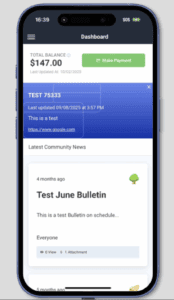
- Ease of user: Managers can publish to both the web portal and mobile app for greater
What’s Improved?
Architectural Requests document requirements
We have further enhanced architectural requests so requiring the upload of documentation is
done when owners create new requests
Previous Behavior:
Document upload requirements in some cases may not have been enforced for new requests
Resolution:
New requests will require uploads when that setting is enabled
October 22nd, 2025
Web Portal v2.2.79
What’s New?
Architectural Request Notes from Managers and Reviewers can notify other reviewers
Reviewers and Managers can choose the visibility of a note and choose to notify all the
Architectural Reviewers of a new note.
Feature Overview:
This feature allows Managers and ARC reviewers to control comment visibility on Architectural
Requests. They can choose whether all or select stakeholders can see them. It also offers the option to email all ARC reviewers with a notification and direct link to the updated request.
NOTE: this is only available on web for now, mobile versions coming soon
Benefits:
- Flexible Communication – Control who sees comments based on sensitivity and relevance
- Faster Reviews – Email notifications with direct links speed up response times
- Protected Discussions – Enable candid internal feedback without exposing all stakeholders
- Reduced Noise – Conditional notifications prevent unnecessary alerts
What’s Improved
Self-Provisioning improvements
We have added multiple updates to the functionality of Self-Provisioning
Previous Behavior:
Subdomain validation only happens at the last step
Confirmation modal wasn’t clear on if the created portal was accessible to users after creation
Move in and move out steps listed on the confirmation screen didn’t lay out a clear next step
When the portal is created, the URL provided didn’t allow immediate access to the creator
Resolution:
Subdomain validation is done when entering information in the field
Confirmation modal is clear on access
Move in and move out instructions are clear
On portal creation, the creator can immediately access the portal
Visitor Management Company Name Addition
We have added the company name for guests to the full guest list page for clarity
Previous Behavior:
Company name or guest name was displayed on the guest list page
Resolution:
Both company name and guest name are displayed on the guest list page
Force Mail settings now enforced
We have improved control of notification settings when the resident’s state requires mail settings enabled
Previous Behavior:
Residents could override management company settings despite the resident’s state requiring those settings enabled.
Resolution:
Management Company settings are enforced for mail
Scheduled bulletins won’t send out undesired copies
We have improved control of scheduled bulletins so messages aren’t sent multiple times
Previous Behavior:
Some bulletins could see multiple copies being sent through email
Resolution:
The system now tracks and restricts that behavior
January 22nd, 2025
Web Portal Version 2.2.52
What’s New?
Custom Logo Upload for Enhanced Branding
We’re excited to introduce a new feature that brings a whole new level of personalization to the platform: Custom Logo Upload for Management Companies and Communities. This enhancement empowers portal administrators to represent their branding more effectively by customizing logos for management companies and individual communities.
For Administrators:
Admins can upload a custom logo to represent their entire company, ensuring their branding is reflected across all communities. Also, Admins can upload unique logos for specific communities. If both company and community logos are set, the community logo will take precedence, displaying it exclusively for that community, formats supported .png, .jpeg, .svg. This feature will be released on demand, for enablement request access to [email protected].
Benefits:
- Enhanced Personalization: Showcase your unique branding across the platform, reinforcing ownership and community identity.
- Flexibility: Differentiate specific communities by assigning unique logos tailored to their identity.
- Consistency: Maintain a professional, branded appearance across all pages where logos are displayed.
What’s Improved?
Work Orders Hidden When Board Members Attempt to Create in Standalone Communities
We’re excited to announce an enhancement to the “Board Members Can Create Work Orders” functionality, implementing a better user experience for standalone communities without accounting provider integrations.
For Board Members:
We have identified a scenario for standalone communities without accounting provider integrations regarding the “Board Members Can Create Work Orders” in the FRONTSTEPS Community platform. The entire Work Orders feature is hidden from Board Members, not just the ability to create them, to make Work Orders visible again, Board Member permissions must be manually adjusted, and this action was not providing a best-in-class user experience.
Benefits:
- Improved Usability: Board Members can now perform their duties by accessing and managing existing Work Orders, even if the creation feature is disabled.
- Aligned Expectations: The functionality now behaves consistently with role-based permissions, eliminating the need for manual intervention to restore Work Order visibility.
Learn More:
Did you know? FRONTSTEPS has created a Frictionless Homeowner Experience by launching a new QR code framework for printed statements and coupon books.
FRONTSTEPS
Dwelling
FRONTSTEPS
Payments
September 9th, 2025
What’s Improved?
Autopay After a Change of Ownership
Scheduled autopay for a previous homeowner no longer continues after the property changes hands.
Previous Behavior:
After a Change of Ownership was completed in Caliber, the payments dashboard could continue to show the previous homeowner on the property. Because the previous owner’s payment profile stayed active, their scheduled autopay could keep processing after they no longer owned the property. That could lead to incorrect payments, refunds, and confusion for homeowners and management teams.
Resolution:
Ownership changes made in Caliber now carry over fully to payments. The previous owner’s scheduled autopay no longer processes for a property they’ve sold, and the dashboard reflects the current owner. This protects former homeowners from unexpected charges and keeps payment records consistent with the accounting system.
August 31st, 2025
What’s Improved?
Scheduled Payment Amount Display Timing
Fixed scheduled payment changes now display consistently with their effective date, instead of showing the new amount ahead of when it actually takes effect.
Previous Behavior:
When a fixed scheduled payment’s amount was edited with a future effective date, the updated amount could appear immediately in both the management company reporting view and the homeowner-facing payment view, even though the next scheduled run still reflected the prior amount. This made it look like the new amount would apply sooner than it actually would.
Resolution:
The amount shown now stays consistent with the payment’s effective date, so homeowners and management company staff see the amount that will actually apply to the upcoming payment run.
November 6th, 2025
What’s New?
Payment Wallets: Apple Pay, Google Pay, and Cash App in Payments 3.0
Feature Overview:
Payment wallets are digital tools that allow users to store payment information securely and make transactions using smartphones. As part of the Payments 3.0 rollout, homeowners now have the flexibility to make payments using leading digital wallets, including Google Pay, Apple Pay, and Cash App—enhancing convenience, security, and choice in the payment experience.
Benefits:
- Wallets add a great convenience of Quick tap-to-pay and reduce checkout time.
- Use of tokenization and biometric authentication (like Face ID or fingerprint) adds layers of protection.
- A diverse range of payment options is now available, delivering a more seamless and user-friendly payment experience for homeowners.
October 22nd, 2025
What’s New?
Update existing scheduled payments with Default payment method
Feature Overview
This feature allows users to automatically update all future scheduled payments to use their newly selected default payment method. When a user changes their default payment method (e.g., bank account, credit card), the system will prompt this change to all upcoming scheduled payments, ensuring consistency and reducing manual effort.
Process: Updating existing scheduled payments with default payment method
1. Add & Set Default Payment Method
The homeowner adds a new payment method (e.g., bank account or card) and sets it as the default.
2. Trigger Pop-Up Notification
A pop-up appears showing a list of existing scheduled payments that are currently linked to the previous payment method.
The pop-up includes two action buttons:
- “Yes, Update It”
- “No, Keep It”
3. User Chooses to Update
If the homeowner clicks “Yes, Update It”, the system updates all listed scheduled payments to use the newly set default payment method.
4. User Chooses to Keep Existing Method
If the homeowner clicks “No, Keep It”, the scheduled payments remain associated with the previous payment method.
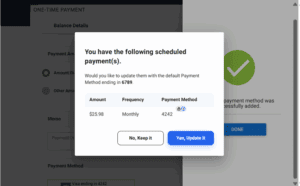
Benefit
1. Improved User Experience
Reduces the need for manual updates to each scheduled payment.
Ensures seamless transition when switching payment methods.
2. Improved User Experience
Minimizes errors or missed payments due to outdated payment details.
Saves time for users and support teams by automating updates.
3. Consistency Across Transactions
Ensures all future payments reflect the user’s preferred method.
Avoids discrepancies between default settings and scheduled actions.
4. Reduced Risk of Payment Failures
Keeps payment information current, reducing failed transactions due to expired or invalid methods.
September 16th, 2025
What’s New?
QuickPay – Secure Account Number Retrieval via Email
Feature Overview:
Homeowners who forget their account number can now click “Forgot your Account?” link to retrieve it via email. This feature is hidden behind a Feature Flag at MC and will be enabled upon request.
Process of Account Number Retrieval in QuickPay
- Click the Link
On the QuickPay screen, the homeowner clicks the “Forgot your Account?” link. - Popup Appears
A popup window prompts the user to enter their registered email address. - Email Validation
The system checks if the entered email matches a registered homeowner. - Email Sent
If a match is found, the system sends a secure email containing:
- All account numbers associated with the user
- A “Pay Now” button next to each property
- A direct payment link for each account
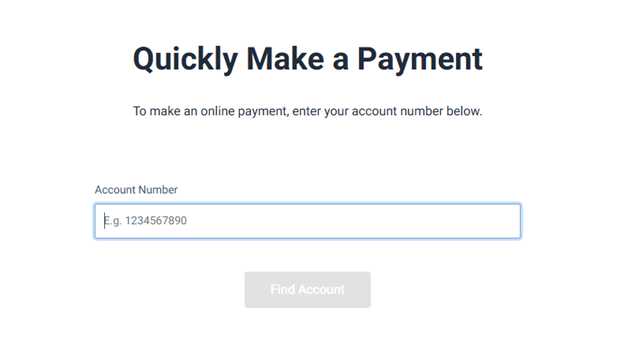
Benefit:
- Reduces support call volume, especially during high-traffic periods like the Superbowl of Payments
- Improves user experience and self-service capabilities
FRONTSTEPS
ALLi
September 30th, 2026
What’s New?
Ask ALLi About Your Own Account (ALLi Enterprise)
Residents get answers about their balance, charges, requests, and violations without calling the office.
Feature Overview:
Money and paperwork questions are the ones residents most often pick up the phone for. What do I owe? Did my payment go through? Where does my architectural request stand? Why did I get a violation? A signed-in resident can now ask ALLi directly. It looks up their balance, transactions, ARC requests, violations, and the profile details the community has on file, and answers with the same information the portal shows. ALLi only reads these records. It doesn’t change anything or take payments, and it can only reach the signed-in resident’s own account.
Benefits:
- Account questions answered at any hour: Residents get the answer when they think of the question, not when the office opens.
- Same answers as the portal: What ALLi says matches what the resident would see if they went looking.
- Only their own information: ALLi works through the resident’s own sign-in, so no one else’s records are reachable.
- Look, don’t touch: ALLi reads records but never changes or pays anything.
- Only what the community supports: If a community doesn’t offer a feature, ALLi doesn’t offer to answer about it.
Amenity Reservations in Chat (ALLi Enterprise)
Residents can check what’s available and book it in the same conversation.
Feature Overview:
ALLi now handles amenity bookings in the community portal. It shows what the community offers along with the rules that matter: when each amenity is open, how far ahead it can be booked, whether reservations are approved automatically or reviewed, and whether there’s a fee or paperwork. Residents can ask when something is free and get the open slots, and see their own reservations with status, confirmation code, and a link to the portal. For a free amenity, ALLi books it once the resident explicitly confirms. The reservation lands exactly like one made on the portal, with the same approval flow and notifications. If an amenity carries a fee, a deposit, or a required signed document, ALLi says so plainly and sends the resident to the portal’s booking page rather than pretending it can finish in chat.
Benefits:
- Availability without a calendar to decipher: Residents ask “is the tennis court free Saturday morning?” and get the open times.
- The rules up front: Hours, advance-booking limits, approval, and costs are explained before anyone tries to book.
- Booked in one conversation: ALLi summarizes the reservation and creates it only after the resident says yes.
- Handled like any other reservation: Approvals and notifications work exactly as they do on the portal.
- No dead ends on paid amenities: ALLi never takes payment and never promises a booking it can’t complete. It hands off to the portal.
What’s Improved?
Faster, More Accurate Reading of Uploaded Documents and Scans (ALLi Enterprise)
Feature Overview:
ALLi is only as good as the documents behind it, and many community documents, like older CC&Rs, bylaws, and amendments, exist only as scans. ALLi now reads PDF, Word, PowerPoint, and image files with a dedicated document-reading service, so scanned pages come through accurately and in a fraction of the time. Large uploads no longer hold up other documents, and photos taken on iPhones (HEIC) are now readable. Documents over 2,000 pages are declined right away with a clear reason, and the upload dialog states the limit.
Benefits:
- Old scans become usable: Scanned CC&Rs and bylaws are read accurately enough for ALLi to answer from them.
- Setup doesn’t stall: Bulk uploads finish without one big file blocking the rest.
- Photos work: Pictures of documents taken on a phone can now be read.
- Clear limits instead of silent failures: If a document is too large, you’re told immediately and why.
A Budget Workbook You Can Work In (ALLi Budget Studio)
The exported budget is now the working budget: edit one tab and everything else follows.
Feature Overview:
The Budget Studio Excel export is now built as a working model. Draft Monthly Budget is the single place to make changes. The annual view, the GL Final Approved column, the Board Ready proposal, and the Caliber Import all update from it automatically. Cells you edit hold plain numbers rather than formulas, so the workbook is usable the moment it’s delivered.
Benefits:
- One place to edit: Change a monthly amount once and every other tab reflects it.
- Board proposal and Caliber Import stay in sync: No re-keying numbers between tabs before the board meeting.
- Plain numbers where you type: Editable cells aren’t buried under formulas.
- Clear on what’s locked: Draft Annual is a read-only roll-up of the monthly budget, and its Review Notes stay editable.
Assessments That Add Up (ALLi Budget Studio)
Every assessment is stated clearly and checked against the GL account its income posts to.
Feature Overview:
Each assessment in the export now shows its installment, per-unit monthly and annual amounts, the units Caliber actually bills it to, whether it’s charged per unit or per square foot, and the GL account its income posts to. The Budget Inputs tab compares each assessment to what’s budgeted in that GL account and shows the difference, with shared accounts counted once. The Board proposal carries a Reconciled / Review flag so you can see at a glance whether the numbers agree. Each assessment’s monthly spread is described in plain terms: Even Monthly, Quarterly, Semi-Annual, Annual, Varies by Month, or No Amount. When ALLi can’t determine a unit count, it flags it rather than estimating.
Benefits:
- Reconciliation done for you: Assessment income is checked against the GL account it posts to without a manual tie-out.
- Know where to look: The Reconciled / Review flag points you to the items that need attention.
- No guessing on units: Participating units come from Caliber’s billing records, and anything unresolved is flagged.
- Spread you can read: The monthly pattern is labeled the way a manager would describe it.
Actuals That Match Your Closed Books (ALLi Budget Studio)
Historical actuals now stop at the last month your books were reconciled through.
Feature Overview:
The export no longer uses a fixed six-month window of history. Actuals now run through the reconciliation cutoff. If the budget is run between the 1st and 14th of the month, actuals run through the end of two months ago. From the 15th on, they run through the end of last month. The column is labeled “Current Actuals,” and ALLi’s insights and board packets stop at the same date, so everything is built from the same data.
Benefits:
- Numbers that match closed books: Actuals never include a month that hasn’t been reconciled yet.
- Insights built on the same data: ALLi’s recommendations and the workbook agree.
- Fewer corrections: Projections tie to Caliber without manual adjustment.
September 1st, 2026
What’s New
24/7 Resident Support in the Community Portal
Residents get answers and get things done at any hour, without waiting for the office to open.
Feature Overview:
Most of what a resident needs from their management company is small, urgent, and predictable. A leaking faucet at eleven at night. Whether the pool is open on a holiday. What ever happened to the work order they filed last week. Each one turns into a voicemail, an email, or a call the office fields the next morning.
ALLi now handles those inside the community portal. It already knows who the resident is and which home they are asking about, so nothing has to be looked up or spelled out. It answers from that community’s own documents and rules rather than generic advice. And it goes past answering: a resident describes a problem in plain language and ALLi files the work order for them, then tells them where it stands whenever they ask. When it cannot help, it hands the resident to the right person at the management company instead of leaving them stuck.
Benefits:
- The office stops fielding the easy ones: Routine questions get resolved at the moment they are asked, at night and on weekends, without anyone on staff being awake for it.
- A problem becomes a work order in one conversation: No form to hunt down, no fields to decipher. The resident says what is wrong, ALLi collects what that community actually requires, and it gets filed once they confirm.
- Residents stop calling to ask what happened to their request: They can check the status themselves, whenever they think of it.
- Nothing happens without the resident saying yes: ALLi always confirms before it submits anything on a resident’s behalf, and it will not quietly file the same request twice.
- It only offers what the community actually does: A resident is never promised something their community does not support.
- A handoff, not a dead end: When ALLi reaches the end of what it can do, it routes the resident to the person the management company chose for exactly that.
Benefits:
Help Before Sign-In
The most common resident problem is not being able to get in. Now something is there when it happens.
Feature Overview:
A locked-out resident is a phone call, every time. They cannot reach the portal, so they cannot reach anything inside it, and the management office absorbs the interruption.
ALLi now sits on the community’s login page, which is exactly where that resident already is. It knows which community’s page it is on, so a visitor never has to explain where they live before asking a question. It answers what it can from what the management company has marked as public, be it the community parking policy, quiet hours, or anything else, and it helps users with any issues related to FRONTSTEPS products, like logging in or making a payment. This is the front door, not the house: nothing behind the login is reachable from it. Available on web.
Benefits:
- Catch the resident before they pick up the phone: Help arrives at the exact moment someone would otherwise give up and call the office.
- No one has to say where they live: The assistant already knows which community it is serving, so the conversation starts with the actual question.
- Public means public: It can only reach material the management company marked as safe for anyone. Resident records and private documents stay behind sign-in.
Conversation Review in Manager
Every conversation ALLi has with a resident is now on the record and open to the management company that owns it.
Feature Overview:
Resident Support in FRONTSTEPS Manager gives a management company oversight of its own resident-facing assistant. Every conversation ALLi has with the company’s residents is collected, attributed to the resident and community it belongs to, and readable end to end, alongside whether ALLi resolved the question or handed it to a person. A running summary shows how that split is trending week over week. When a specific conversation matters, a manager narrows to one community, a date range, or only the conversations that escalated, and searches by resident or topic.
Benefits:
- Verify instead of trusting: The question every board and every prospect asks is what the bot will say to a homeowner. This is the answer, in the assistant’s own words, on demand.
- Review the exceptions, not everything: Conversations ALLi could not resolve are marked, so oversight means reading the handful that went wrong rather than wading through the ones that went right.
- A number for whether it is working: The weekly resolved-versus-escalated split gives a management company something concrete to judge the assistant by, and to bring to a board that wants to know what the AI is doing.
- Close the loop on a resident complaint: When a homeowner calls disputing something the assistant told them, staff can find that conversation and read it rather than guess.
- A record that cannot be rewritten: Because no one can alter or delete a conversation, the transcript stays trustworthy as evidence after the fact.
Teaching ALLi About Your Communities
An assistant is only as good as what it knows, and the management company now controls that directly.
Feature Overview:
An assistant answering from generic knowledge is worse than no assistant, because it will confidently give a resident the wrong pool hours. ALLi answers from what the management company gives it, and supplying that is now self-service.
Companies load the documents, policies, and CC&Rs residents actually ask about. They can upload them, or pull in documents they already keep in FRONTSTEPS Caliber and FRONTSTEPS Community, so nothing has to be recreated or hunted down. Each item is marked for who may see it: anyone, only verified residents, or both. Companies also choose who ALLi points people to when it cannot help, and describe in plain language how their company operates, so the assistant sounds like them rather than like software. All of it can differ between anonymous visitors and signed-in residents, and all of it can be tried out before a resident ever sees it.
Benefits:
- Accuracy belongs to the company, not a ticket queue: A wrong answer gets fixed by correcting the source material, the same day, without involving FRONTSTEPS.
- Use the documents you already have: Pull straight from FRONTSTEPS Caliber and FRONTSTEPS Community rather than tracking down files and uploading them again.
- Verified-resident material stays that way: Each document is marked for who can reach it, so nothing meant for residents ends up answering an anonymous visitor.
- Load a portfolio-wide policy once: Something true for every community is set at the company level instead of repeated community by community.
- Escalation goes to a real person you picked: And to a different person for public versus signed-in conversations, if that is how the company works.
- Try it before residents do: Preview the assistant after a change and see what a resident would get.
Look and Feel
Residents should feel like they are talking to their management company, not to a vendor.
Feature Overview:
Trust in a resident-facing assistant starts with whether it looks like it belongs. A management company names the assistant whatever fits their brand, sets its accent color to match the community site residents already know, and decides where it appears: the public site, the resident portal, or both. Readability is handled automatically, so no color choice can make the assistant hard to use. All of it is set by the company, in minutes.
Benefits:
- It reads as their assistant, not ours: Residents experience it as part of the service their management company provides, which is what makes them willing to use it.
- It matches the site residents already trust: No jarring third-party widget bolted onto a familiar page.
- Roll out at your own pace: Start on the public site, or only in the resident portal, and expand when ready.
- No design ticket, no waiting: Change the name or color and see it live, with contrast handled so nothing breaks.
July 9th, 2026
What’s New
Workflows: Intelligent Checklists in Step Creation (Pro tier feature)
Transform the Step creation in FRONSTEPS Manager modal into a collaborative workflow builder that mixes automation from ALLi with human-in-the-loop checkpoints. Managers can assign tasks to ALLi, schedule and recur work, embed structured prompts, and route individual checklist items to teammates—all from one place.
Feature Overview:
What’s New:
Intelligent Budget Generation
Intelligent Budget Generation guides Community Managers through the complete annual budgeting process in one connected experience.
Managers begin by selecting the community and budget year, entering expense-growth assumptions, choosing an insurance projection method, uploading a Reserve Study, selecting a reserve-funding approach, and providing any known issues or additional community context. Each step is validated as the Manager progresses, and a final review screen summarizes the assumptions before the budget is generated.
Using Caliber general-ledger data and the Manager’s inputs, the budgeting engine then creates a proposed annual operating budget using a transparent calculation hierarchy:
Manual Override → Schedule Override → Annualized YTD with Growth → Prior-Year Budget → Prior Actual → CPI → Placeholder
Every budget line identifies how its value was calculated, making the resulting budget fully traceable and easier to audit. Account mapping also helps apply a consistent budgeting structure across communities.
The generated budget includes the supporting schedules Managers expect, including bad debt, insurance-renewal blending, reserve funding, planned projects, Balance Sheet statements, and Income and Expense statements.
Once the baseline budget is ready, ALLi evaluates each general-ledger account individually and recommends potential adjustments. These recommendations are grounded in the community’s historical Caliber data, shared community context, uploaded documents, Manager-provided notes, and relevant market or inflation information.
Each ALLi recommendation includes:
- The recommended percentage and dollar adjustment
- An explanation of the recommendation
- An option to apply or dismiss the recommendation
Recommendations appear in the Budget Viewer alongside the baseline budget. Managers can apply, review, undo, or dismiss recommendations while totals update automatically. Lines modified using an ALLi recommendation are visually identified, and the reasoning remains available for review.
When the budget is complete, the Manager can generate a final FRONTSTEPS Excel workbook with live formulas. The workbook reflects the final values shown in the Viewer and includes an automatically populated Caliber Import tab to help streamline loading the approved budget back into Caliber.
Benefits:
One guided budgeting workflow
Managers are guided from initial assumptions through final export without needing to understand the underlying mechanics of workbook construction.
- Formula-accurate and traceable
Every number comes from Caliber data, an explicit assumption, a supporting schedule, or a Manager override. Each budget line explains how it was calculated. - Account-level intelligence
ALLi evaluates individual accounts instead of applying a single growth percentage across the entire budget. - Managers remain in control
ALLi provides recommendations, but nothing is changed without the Manager choosing to apply it. Recommendations can also be reversed at any time. - Consistent across a portfolio
Account mapping and standardized calculation logic make it easier to produce consistent budgets across multiple communities. - Board-ready Excel output
The final workbook contains live formulas, reflects the reviewed budget, and includes the information needed for board and accounting review. - Ready for Caliber
The automatically populated Caliber Import tab reduces the manual work required to enter an approved budget back into the accounting system.
What’s Improved:
- Replaces the chat-based Budget Draft Agent with a structured, validated experience designed around the way Community Managers build budgets.
- Eliminates the need to export data, rebuild formulas, repair workbook errors, and repeat the same spreadsheet process for every community.
- Replaces blanket percentage increases with account-specific recommendations grounded in historical and community-specific information.
- Gives Managers a clear record of what changed, why it changed, and which values were influenced by ALLi.
- Brings budgeting intake, generation, analysis, review, and export together in FRONTSTEPS Manager.
Why It Matters:
Budget preparation has traditionally required Community Managers to export general-ledger information, gather prior budgets, review financial statements, rebuild formulas, validate assumptions, and repeat the process for every community they manage.
Intelligent Budget Generation brings that process into one guided workflow.
Budgets that previously took days of spreadsheet work can now be created through a faster, more consistent, and fully traceable process. ALLi performs the account-level analysis while the Community Manager retains final control over every change.
Primary users: Community Managers, accountants, finance teams
Secondary users: Board members and other members reviewing the completed budget
Benefits:
- Hybrid Automation, On Your Terms: Seamlessly blend AI and human steps so routine work is automated while key decisions stay with people.
- Clear Ownership & Accountability:
@mentionsassign every item to either ALLi or a teammate, eliminating ambiguity and handoff delays. - Consistency at Scale: Markdown prompts standardize instructions, ensuring ALLi delivers predictable, repeatable results across communities.
- Faster Cycle Times: Scheduling and recurrence reduce lag between steps and keep recurring work moving without manual kicks.
- Richer, Traceable Audit Trail: ALLi’s comment posts and auto‑attached outputs create a complete record of what ran, when, and by whom.
- Fewer Reworks Through Context: By reading prior comments, ALLi tailors follow‑up actions to the latest information rather than starting from scratch.
- Flexible Orchestration: Reorderable checklists make it easy to adapt processes as requirements change—no heavy reconfiguration needed.
January 16th, 2026
What’s New
Workflows: Intelligent Checklists in Step Creation (Pro tier feature)
Transform the Step creation in FRONSTEPS Manager modal into a collaborative workflow builder that mixes automation from ALLi with human-in-the-loop checkpoints. Managers can assign tasks to ALLi, schedule and recur work, embed structured prompts, and route individual checklist items to teammates—all from one place.
Feature Overview:
The updated Step creation experience now functions as a lightweight workflow engine tailored to HOA operations. When creating a Step, managers can:
- Assign ALLi as an Assignee: Choose ALLi as the task owner for any checklist item to have it executed automatically in the background.
- Build Reorderable Checklists: Break a Step into clear, movable checklist items to mirror the exact process you follow.
- Embed Structured Prompts (Markdown): Add rich, markdown-based instructions to guide ALLi—include data points, links, and formatting to standardize outcomes.
- Use Inline @Mentions for Routing: Assign items with
@mentions(e.g.,@allifor AI execution or@alexfor a teammate). Mentions drive automatic assignment and clarify ownership. - Automated Comment Responses: As ALLi completes her items, she posts results directly into the Step’s comments—creating a running, auditable transcript.
- Context-Aware Follow‑Ups: ALLi automatically uses prior comments and outcomes as context for subsequent items, improving relevance and continuity.
- Auto‑Attach Outputs: Files or reports generated by ALLi are attached to the Step automatically for easy review and sharing.
- Hybrid Execution Rules: ALLi executes only the checklist items addressed to
@alliand pauses when the workflow reaches items assigned to people. Once the human completes their item, processing continues with subsequent AI-assigned tasks—no manual restarts required.
Benefits:
- Hybrid Automation, On Your Terms: Seamlessly blend AI and human steps so routine work is automated while key decisions stay with people.
- Clear Ownership & Accountability:
@mentionsassign every item to either ALLi or a teammate, eliminating ambiguity and handoff delays. - Consistency at Scale: Markdown prompts standardize instructions, ensuring ALLi delivers predictable, repeatable results across communities.
- Faster Cycle Times: Scheduling and recurrence reduce lag between steps and keep recurring work moving without manual kicks.
- Richer, Traceable Audit Trail: ALLi’s comment posts and auto‑attached outputs create a complete record of what ran, when, and by whom.
- Fewer Reworks Through Context: By reading prior comments, ALLi tailors follow‑up actions to the latest information rather than starting from scratch.
- Flexible Orchestration: Reorderable checklists make it easy to adapt processes as requirements change—no heavy reconfiguration needed.
November 17th, 2025
What’s New?
Microsoft Outlook Integration – Premium Feature
You can now connect your Microsoft Outlook account to ALLi to sync important email communications and enhance cross-platform workflows.
Feature Overview:
- Centralizes communication for easier follow-up and collaboration.
- Improves task context and reduces time spent switching between tools.
Benefits:
- Securely connects Outlook to ALLi for email integration.
- Lets you link emails to tasks, agents, or packets directly.
Smarter Visuals for Board Packet Generation
Report groups are now auto-attached during board packet creation, reducing manual setup and ensuring consistent outputs.
Feature Overview:
- Automatically links report groups to packet fields using predefined rules.
- Applies preset grouping criteria to minimize manual adjustments.
Benefits:
- Saves time preparing board packets.
- Reduces errors from manual group assignments.
Targeted Interactions with Specific Agents
You can now direct your questions to a specific agent in ALLi, enabling more accurate and relevant responses.
Feature Overview:
- Supports agent-specific parameters for precise routing.
- Delivers focused processing in complex workflows.
Benefits:
- Gives admins greater control over automation behavior.
- Optimizes multi-agent workflows with targeted responses.
Caliber Fact Sheet Integration
ALLi now pulls in Caliber fact sheets, bringing key property information directly into your reports for seamless meeting prep and review.
Feature Overview:
- Fetches fact sheet data from Caliber systems into ALLi.
- Displays that information within ALLi’s reporting views.
Benefits:
- Centralizes key property facts for board and manager use.
- Improves visibility into community metrics and reporting.
Enhanced Agent Profile Descriptions
Agent profiles now include detailed notes that describe each agent’s capabilities, helping users quickly understand what each agent can do and select the right one for the job.
Feature Overview:
- Store rich descriptions and metadata with agent profiles.
- Improves discoverability and understanding in support tools.
Benefits:
- Speeds up onboarding and troubleshooting for support staff.
- Reduces miscommunication with better documentation.
Click-to-Link Report Groups
The front-end interface now lets users visually connect report groups to board packets during creation or editing, with built-in guidance to avoid errors.
Feature Overview:
- UI to visually link report groups during packet setup.
- Includes inline validation and proactive guidance.
Benefits:
- Streamlines setup and reduces configuration mistakes.
- Minimizes need for support assistance on packet setup.
Fixed Task Assignment Bug
Resolved an issue where tasks created by ALLi were sometimes assigned to the wrong Suite Manager. Assignments now work as expected.
Feature Overview:
- Corrected logic for automated task assignments.
- Ensures tasks go to the right Suite Manager every time.
Benefits:
- Improves accountability through accurate task ownership.
- Reduces time spent fixing assignment errors.
Export Full Chatbot Conversations to PDF – ALLi
You can now export entire chatbot conversations in ALLi to PDF for recordkeeping or audit purposes.
Feature Overview:
- One-click PDF export for full chatbot transcripts.
- Ideal for archiving or compliance reviews.
Benefits:
- Easy to store and share conversation records.
- Supports compliance, training, and reporting needs.
November 3rd, 2025
What’s New?
Core Voice Support (Phase 1)
Talk to ALLi using your microphone for hands-free, natural interaction. Phase 1 delivers the foundation of voice-first productivity.
Feature Overview:
Voice input is now available to initiate and continue conversations with ALLi without typing. This release focuses on reliable microphone capture, clear permission handling, and smooth handoff into the existing chat experience.
Benefits:
- Hands-free productivity: Ideal for managers in the field or while multitasking.
- Accessible by design: Reduces friction for users who prefer speaking to typing.
- Platform for growth: Establishes the base for future “do this by voice” actions.
Support Site – Agent Description Datapoint
Standardized “Agent Description” metadata is now available to enrich discovery and documentation.
Feature Overview:
Each agent on the Support Site now includes a consistent description field, enabling clearer explanations of purpose and scenarios. This metadata supports AI Hub views and external API consumers that index or display your agent library.
Benefits:
- Consistent documentation: Clear, comparable agent profiles across your library.
- Better discovery: Easier for teams to find the right agent for the job.
- Integration-ready: Cleaner downstream use by hubs, training content, and APIs.
Support Site – Agent Description Datapoint
Standardized “Agent Description” metadata is now available to enrich discovery and documentation.
“Top 10 Prompts” (Replaces Pre-Defined Prompts)
Data-informed starter prompts replace the static list to help users get value faster.
Feature Overview:
ALLi now surfaces a dynamic Top 10 Prompts set on the home and/or empty state screens. These prompts are selected from real usage patterns to maximize clarity and jump-start productive conversations.
Benefits:
- Faster first win: Shortens time-to-value for new and returning users.
- Higher engagement: Prompts reflect what users actually do most. Evolves with usage: Room to rotate or A/B test by role over time.
- Evolves with usage: Room to rotate or A/B test by role over time.
Sidebar Navigation Menu
A persistent left-hand sidebar organizes ALLi into intuitive sections to improve discovery and scalability.
Feature Overview:
The new sidebar groups core areas (e.g., Documents, Prompts, Agents) and provides a stable home for future ALLi “apps.” It reduces clicks, shortens learning curves, and makes room for multimodal features.
Benefits:
- Speed to action: Find what you need faster with fewer page hops.
- Designed to scale: A framework that accommodates new features gracefully.
- Higher adoption: Clearer wayfinding increases feature discovery.
- Workflow Consistency: Matches Caliber’s compliance standards while streamlining steps in Suite Manager.
- Fewer Handoffs: Allows CAMs to progress violations independently.
What’s Improved
Date & Time Awareness Accuracy
Restores trustworthy scheduling and time-based logic across ALLi.
Previous Behavior:
In certain contexts, ALLi referenced an outdated date (commonly June 2024), which could misalign reminders, scheduling, and other time-sensitive logic for some users and roles.
Resolution:
Temporal handling has been corrected to consistently reference current system date and respect time zones across supported environments.
Benefit:
Reliable planning: Accurate dates/times improve trust in reminders, schedules, and automations.
Omnisearch Filter Reliability
Filters now return complete, consistent results across complex queries.
Previous Behavior:
Some users saw incomplete or inconsistent results when applying certain Omnisearch filters, which disrupted data-heavy workflows.
Resolution:
Filtering logic and validations were refined to ensure expected results across edge cases and combined parameters.
Benefit:
Confidence in results: Teams can rely on search to find the right records without manual workarounds.