A lot is changing here. Stay informed with what is coming out of FRONTSTEPS and all of the new products we are releasing
Release Notes


FRONTSTEPS
Manager
December 15th, 2025
What’s New:
Expanded Community Landing Page Information Modules
We’ve added new read-only modules to the Community Landing and Detail Pages, designed to centralize key community information and enhance visibility.
Overview Tab:
- Fact Sheet: Displays structured community data using field codes and values for quick reference.
- Billing Records: Lists all active billing items, including name, start/end dates, amount, frequency, type, and posting day.
Records Tab:
- CC&Rs: Provides a read-only view of Covenants, Conditions, and Restrictions.
- Documents: Shows uploaded community files with metadata like name, upload time, file size, and download option (read-only view).
Community Notes
- Chronological list view with timestamps, author details, and file attachments.
Community Contacts:
- Client Contacts: Displays contact name, title, membership, email, phone, and date range. Expired contacts are indicated with a count badge.
- Vendor Contacts: Lists vendor name, contact name, email, and phone number.
Benefits:
- Centralized Visibility: All critical info in one place.
- Reduced Navigation: Fewer clicks to access what matters.
- Operational Efficiency: Quick access to support daily community management tasks.
December 3rd, 2025
What’s New?
Payments Integrated in Manager
All Payments functionality is now built directly into the Manager experience, so users no longer need to navigate to the separate Payments product.
Feature Overview:
Users can access the full Payments toolset inside Suite Manager. This consolidates workflows and removes the need to switch products to complete payment-related tasks.
Benefits:
- Single Experience: Payments tasks can be completed without leaving Manager.
- Less Context Switching: Eliminates the extra step of opening the standalone Payments product.
Community Landing Page / Community Detail Page Improvements
The Community Landing Page and Community Detail Page now include ongoing improvements through newly added modules.
Feature Overview:
Each new module added to the Community Detail Page is part of this release, enhancing the community landing/detail experience and making key information easier to access in one place. As part of this update, we introduced the new Metrics Tab, which includes blocks with item counters (Violations, ARCs, Work Orders, Invoices, Delinquencies) that highlight items requiring accelerated or urgent action from CAMs. Clicking any of these counters takes users directly to the filtered list view of those items, enabling immediate action.
The Metrics Tab also includes two additional sections: one displaying the list of active standalone steps related to the community, and another showing Violations or Work Orders that have moved to Past Due.
Benefits:
- Richer Community View: More information and tools surfaced directly on the landing/detail pages.
- Better Navigation: Modules bring frequently used community context closer to the user.
Step Projects Enhancements: Search + Related Links
Improvements related to Step Projects were introduced. From now on, the search bar allows users to search for Step Projects, and it is now possible to add Related Links to Step Projects, just as it already works for regular Steps.
Feature Overview:
Users can now:
- Search for Projects directly within Suite Manager.
- Add Related Links to Projects (previously only supported for Steps).
This makes it easier to connect supporting content and cross-reference work.
Benefits:
- Faster Project Discovery: Find projects quickly via search.
- Stronger Context Linking: Related links extend knowledge and references beyond Steps into Projects.
November 18th, 2025
What’s New?
Processing Invoices: Approving & Rejecting
You can now approve or reject invoices directly within Suite Manager, streamlining how communities review and act on incoming financial documents.
Feature Overview
This new enhancement introduces the ability for authorized users to approve or reject invoices from within the Invoices workflow. Each invoice record now includes clear action buttons, visual status indicators, and contextual messages that guide users through the decision-making process.
The new workflow supports roles responsible for financial operations, vendor management, and billing review. All actions are stored for audit purposes and integrate with existing ledger and reporting flows.
This feature is available in the web application.
Benefits:
- Faster Financial Decisions: Eliminates back-and-forth emails by allowing decisions directly in the system.
- Improved Accountability: Approval and rejection actions are logged for transparency and auditing.
- Streamlined Operations: Reduces processing time for invoices and improves workflow efficiency for management teams.
Standard Search (Free-Tier Search Experience)
A new, non-AI search option gives all users access to fast, reliable keyword-based search throughout Suite Manager.
Feature Overview
The new Standard Search provides a simplified search experience across communities, records, and operational data without relying on AI. Users can enter keywords and navigate directly to the content they need—perfect for customers who prefer deterministic results or operate in environments where AI search is not enabled.
This update ensures broad search capability across the platform while reserving more advanced, AI-powered Omnisearch capabilities for premium tiers.
Benefits:
- Universal Availability: Ensures every Suite Manager customer has access to essential search capabilities.
- Predictable Results: Offers clean, consistent keyword matching without AI interpretation.
- Improved Navigation: Helps users move more quickly through common records and workflows.
Community Landing Page
A redesigned, read-only Community Landing Page centralizes vital community information in a modern, structured layout.
Feature Overview
The new Community Landing Page introduces a modular, intuitive design built around four read-only components:
- Fact Sheet: Core details such as name, address, identifiers, and community attributes.
- Client Contacts: Key representatives and their roles for operational coordination.
- Documents: Access to relevant governing and operational documents.
- CC&Rs: Quick visibility into Covenants, Conditions & Restrictions associated with the community.
This redesign improves clarity and supports upcoming enhancements such as editing, deeper navigation, and integrated community insights.
Benefits:
- Centralized Information Hub: Gives users a single, unified location to review community details.
- Improved Clarity & Layout: Modernizes the experience, reducing the need to navigate multiple modules.
- Future-Ready: Establishes the structural foundation for enhancements planned for early 2026.
What’s Improved
More Accurate Violation Dates
Violation created dates now display consistently across the interface, ensuring more reliable compliance reviews.
Improved Unit Selection Behavior
Checkboxes on unit selection screens behave more predictably, ensuring that selections stay in sync with user actions.
Cleaner Dropdown Behavior
Dropdown menus now properly reset when navigating between records, preventing incorrect or lingering values.
Clearer Assess-Now Feedback
Assess-Now actions in Violations now provide consistent visual feedback, reducing confusion when managing fines or compliance events.
More Reliable Violation Processing
Updates to backend logic improve the accuracy and stability of Violation actions, including assessing violations and generating letters in complex scenarios.
November 3rd, 2025
What’s New?
Violation Management Enhancements
Community Managers now have more control and flexibility when managing violation communications and workflows.
Feature Overview:
Several updates improve how violation letters and fines are generated, sent, and tracked in Suite Manager. Managers can now send letters immediately using a new Send Now button in the Associated Letter section, or easily Resend and Regenerate letters as needed. Additional workflow updates allow users to manually advance violations to the next step, update appeal dates, and experience a refreshed interface with clearer text labels and improved layout consistency.
- Greater Control: Take immediate action on violation letters without waiting for automated triggers.
- Efficiency Gains: Quickly correct or resend correspondence directly from the violation record.
- Improved Clarity: Updated labels and design elements make managing violation stages easier and faster.
What’s Improved
Reporting Reliability
Lots of bug fixes to ensure reports display data consistently without blank or missing results.
Previous Behavior:
Users occasionally encountered empty states after running a report, requiring manual refresh to view results.
Resolution:
The reporting service now automatically refreshes Recently Run Reports upon completion, ensuring data loads correctly every time.
Benefit:
Users always see current and complete report results without extra steps or confusion.
Invoice and Billing Accuracy
Financial data now calculates and displays correctly throughout billing workflows.
Previous Behavior:
Invoice amounts occasionally lost decimal precision, and batch totals sometimes displayed incorrect values.
Resolution:
Both invoice calculation and batch summary logic have been corrected to ensure accuracy in all billing displays.
Benefit:
Provides accountants and managers with trustworthy financial data, minimizing manual corrections.
October 6th, 2025
Version: 0.1.948
Create Violations
Easily log new violations from within Suite Manager and ensure consistent tracking across communities.
Feature Overview:
Community Managers can now create new violations directly from the Violations List or Property detail page. When creating a violation, users can select a category, define the violation item, capture violation and inspection dates, and attach photos or descriptions for context. The system automatically associates the violation with the correct homeowner, address, and community, ensuring accurate recordkeeping from the start.
Once created, violations appear instantly in the list view and can be linked to related Steps, ARCs, or Work Orders via Omnisearch.
Benefits:
- Faster Data Entry: Streamlines the violation logging process by eliminating extra steps.
- Improved Accuracy: Automatically links violations to the correct property and homeowner.
- Better Recordkeeping: Allows users to include photos and detailed descriptions up front.
Update Violations
Maintain complete, accurate records with editable violation details and supporting attachments.
Feature Overview:
The new Violation Detail Page gives Managers and Admins full visibility into a violation’s lifecycle and provides tools to update details as needed. Users can:
- Edit the description and corrective measure (Required Action) fields.
- Add or remove photos and captions.
- Manage appeal dates, inspection data, and inspector assignments.
- Track letters, fines, and notes in separate tabs for clarity.
All updates are captured in the audit log, so users can see who made changes and when.
Benefits:
- Transparency: Every update is tracked for full accountability.
- Efficiency: Makes it easy to modify details without switching screens.
- Comprehensive View: Combines letters, fines, and notes into one unified interface.
Advance Violations Through the Process
Move violations seamlessly through the full compliance workflow—from open to resolution.
Feature Overview:
Suite Manager now supports a guided violation workflow that mirrors Caliber’s established process. Users can advance a violation through three key stages: Open → Monitored → Closed, applying required actions and sending letters along the way.
Each action step supports:
- Selecting and sending letter templates.
- Editing or reprinting letters as needed.
- Applying, waiving, or locking fines.
- Updating Follow-Up By dates with validation.
- Adding or updating the Corrective Measure (Required Action).
What’s Improved
Violation Management Experience
Enhanced reliability and user experience when managing violations.
Previous Behavior:
Users needed to switch between multiple Caliber modules to track or update violation details. Letter sending, fines, and corrective actions were managed in separate views, creating friction and slowing compliance work.
Resolution:
The new Violation Detail Page consolidates all functions, creation, updates, and advancement, into a single, intuitive screen. Users can now view status, send letters, assess fines, and update required actions without leaving the page.
Benefit:
A unified, modern interface that speeds up compliance workflows and provides a clearer picture of each violation’s history.
September 17th, 2025
Version: Suite Manager Web - Production
What’s New?
Enhanced Violation Management
Managers now have greater flexibility to update and advance violations directly within Suite Manager.
Feature Overview:
The Violations module has been expanded to allow full editing and management in one place.
Users can now:
- Add or edit violation descriptions
- Change status, inspector, violation date/time, and appeal date
- Upload single or multiple photos
- Add/edit photo captions, update, delete, and download photos
- View fines associated with a violation
These changes streamline the violation lifecycle, enabling staff to update cases quickly without switching tools.
Benefits:
- Time Savings: Manage all aspects of a violation in a single location.
- Flexibility: Update details and supporting photos as a case progresses.
- Transparency: Provide clear documentation of violations and related fines.
Group Reporting
Introducing a new way to run multiple reports at once and access recent reporting history.
Feature Overview:
The Reports page now features a tabbed layout separating Group Reports from Single-Client Reports. Users can:
Not all reports are available in group format yet — additional report types will be added in future releases.
Benefits:
- Efficiency: Run and review multiple reports in a single action.
- Organization: Clear separation between group and individual reports.
- Convenience: Quickly access recently generated report groups.
Architectural Notes Email Notifications
Managers can now send email notifications when adding a note to an architectural request, improving communication with homeowners and reviewers.
Feature Overview:
When creating a new note on an architectural request, managers can set visibility (Everyone, Managers & Reviewers, or Managers Only). Depending on visibility, optional checkboxes allow sending notifications to:
- ARC Committee members (reviewers/board)
- Homeowners linked to the request
Emails include note details (date, author, content) as well as request details (application number, type, association name, address, and a link). All notification actions are recorded in the request’s Actions/Notifications tab for tracking.
Benefits:
- Improved Communication: Homeowners and board members receive timely updates on ARC notes.
- Accountability: Notifications are logged for transparency and recordkeeping.
- Flexibility: Managers choose who sees notes and who gets notified.
FRONTSTEPS
Caliber
December 17th, 2025
Version 5.84
What’s New?
Exciting New Features in FRONTSTEPS Manager
Remember that you can click the “Manager” button to explore these new features in addition to easily
managing architecture, violations, and work orders in an enhanced web experience!
- Payments in Manager
The FS Pay Dashboard is now integrated into Manager, giving CAMs and authorized teams direct access
to homeowner payment and balance details. Answer payment questions in real time, reduce system
switching, and support homeowners faster during peak payment season. - Unit Detail Page
Search for any unit and open the Unit Detail Page to view a summary of unit health, open violations,
architectural requests, work orders, delinquencies, contact info, and notes, all designed to surface
actionable insights at a glance. - Community Detail Page
Search for any community and open the Community Detail Page to view fact sheets, billing items,
CC&Rs, documents, and contact lists. See a clear snapshot of community health and address
outstanding or time-sensitive needs with fewer clicks.
November 11th, 2025
Version 5.82
What’s New?
New Delinquency Fee Option: “Lowest Fee”
You can now configure delinquency fees to automatically apply the lower of two fee types—making compliance even easier.
We’ve added a new configuration option for delinquency fees! You can now choose to apply the lesser of either a flat fee (fixed dollar amount) or a percentage of the late amount. This enhancement supports compliance needs in jurisdictions where fee limits vary, giving you more flexibility and control.
September 23rd, 2025
Version 5.81
What’s New?
Architectural Notes – Notifications
Homeowners and architectural committee members can now be notified when a new note is added to an architectural request!
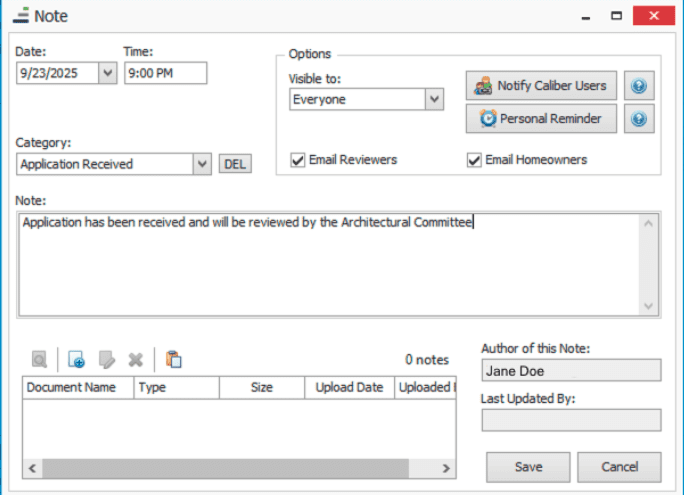
When adding a note to an architectural request, users will now have the option to send an email notification to either architectural committee members, homeowners, or both. The email includes the note’s contents and key details about the request, sent to the recipient’s primary email address.
This feature will streamline communication to all parties involved in the architectural process, making it more efficient and transparent. We’ve also added a new visibility dropdown, clearly indicating whether a note is visible to everyone, managers and reviewers, or only managers.
August 21st, 2025
Version 5.80
Announcing Our Partnership with TechCollect
FRONTSTEPS has just made AR recovery faster, simpler, and more compassionate with our partnership with TechCollect!
With the new Free Trial Integration with TechCollect, you can now launch a free trial directly from your FRONTSTEPS dashboard. No extra logins, no setup delays. Look for the TechCollect button in the upper right of the Caliber screen!
This integration combines FRONTSTEPS’ all-in-one community management platform with TechCollect’s AI-powered AR recovery tools, giving you:
- Faster recovery without extra labor
- Predictive insights on which accounts will pay and when
- Fewer legal referrals and lower legal costs
Architectural Report Enhancements
New options have been added to the Architectural reports in the Client Reporting Toolbox and Report Groups:
- New Date filters when running from the Client Reporting Toolbox
- Option to choose to ignore date ranges when running the reports as part of a report group.
- Option to sort reports by date in ascending or descending order.
June 26th, 2025
Version 5.78
What’s New?
Delinquency – Split Report by Community
When running delinquency, users will now have an option to insert page breaks between clients when printing the report, which will make it easier to share delinquency information with your communities.
API Access Management Update
To better support and scale the FRONTSTEPS Caliber API, a below-industry-standard access fee for third-party vendors was introduced on January 1, 2025. As part of this enhancement, direct creation and management of API user accounts is now handled by our Customer Support team. FRONTSTEPS Caliber customers using the API for internal purposes will not incur any charges.
If you’re working with a third-party vendor or integration that requires API access, please contact [email protected] to ensure proper onboarding and alignment with our API access expectations. Most vendors recognize the added value this access brings and are not passing associated costs on to our mutual customers.
May 21st, 2025
Version 5.77
What’s New?
Improved Credential Management for AP Automation
For customers of First Citizens Bank VendorPay and for our Edenred Pay customers – we’ve improved the management of API credentials. The new process will no longer require the customer to update their credentials in Caliber even after they have expired in Edenred Pay.
What’s Improved?
Report Cover Sheet – Field Codes
Resolved an issue where client field codes were not properly populating in Report Cover Sheet templates.
April 24th, 2025
Version 5.76
What’s New?
- High priority bug fixes
- Improvements to AP Automation
- For customers in our Corporate Accounting Beta program: We’ve added the ability to enter charges directly within Caliber. Keep track of copies, mailings, and other miscellaneous charges in Caliber. Review and post charges directly to your customer’s AP!
March 20th, 2025
Version 5.75
What’s New?
Enhanced Architecture Notifications
We’ve added the capability of creating a custom message when sending notification emails to board members and homeowners upon completion of an architectural step.
Additional features of this enhancement include:
- Notifications can be configured at the Master or Client level
- Custom messages will support architectural fields codes and enhanced formatting
- If a custom message is not specified, the current notification text will be used instead.
- For all notifications, we’ve appended critical information for the item at the end of the message, including application number, request type, community name, unit address, and a link to the architectural item in FRONTSTEPS Community.
What’s Improved?
Client Dashboard – Notes Report
We’ve improved the Notes report when running from the Client Dashboard. It will now preserve the formatting of the notes so that line breaks are retained and the content of the notes is more legible within the report.
Febuary 20th, 2025
Version 5.74
January 23rd, 2025
Version 5.73
What’s New?
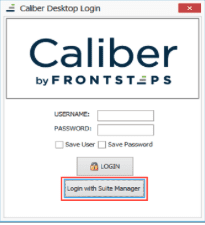
Login to Caliber with Suite Manager
For Suite Manager users, you will now have the option to login to Caliber with your Suite Manager credentials. This method of authentication will allow you to seamlessly transition from Caliber to Suite Manager in your day-to-day activities.
FRONTSTEPS
Community
December 1st, 2025
The Web Portal v2.2.81
What’s New?
Change of Invoice Interface for Board Members
Feature Overview:
This update allows board members to see invoices they need to provide votes/approvals for on a specific tab titled ‘Board Member’ and all invoices on the ‘Invoices’ Tab . This separation removes confusion on what approvals applies to (only board member approvals are counted for the approvals column) and maintains the previous functionality which allow board members to see past invoices.
Benefits:
- Clarity – Approvals and actions belong on their own tab and in a deliberate context for
greater user clarity
- Better Management of the Process – Board Members can see in a specific place the
invoices that need their attention
- Reduced Questions – Expectations and Requirements are now clear
What’s Improved?
Architectural Request File size updates
We have increased the file sizes for managers when upload documents for owners to review when submitting an Architectural Request. Owners also have a greater limit when uploading documents during the submission process.
Previous Behavior:
- Managers could only upload 5MB files with a total file size of 20MB
- Owners could only upload 20MB files on the web portal with a total size of 25MB
Rsolution:
-
Managers can upload 50MB files without a total file size restriction on the web portal
-
Owners can upload 50MB files without a total file size restriction on the web portal
Payments Call-to-Action Updated
We have updated the call-to-action on the payments button for greater clarity for owner users managing their finances
Previous Behavior:
-
Questions would impede owners from clicking ‘pay now’ to start the payment process
Resolution:
- Button has been updated to “Review & Make Payment” so owners understand clicking that button doesn’t immediately start a payment
Architectural Notifications
We have updated the architectural request notifications on the web portal to correctly reach the reviewers (if that option is selected) and homeowners (if that option is selected) when the note is visible to reviewers and homeowners
Previous Behavior:
- Notifications wouldn’t reach homeowners as expected
Resolution:
- Notifications are reaching homeowners and reviewers on Architectural Request notes add to the Community Portal when those notes are set to be viewed by homeowners
October 22nd, 2025
The Mobile App v6.8.0
What’s New?
Notification Banners
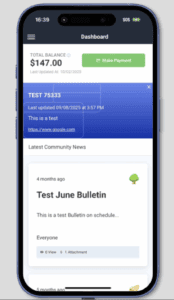
Managers can now create notification banners for both the web portal and mobile app
Feature Overview:
This feature allows community managers to publish notification banners to both the web portal and the mobile app. Notification banners are seen on the dashboard by owner users after they login to the application. This allows for in-app communication to every community user without having to manage email messages when community-wide advisory notices are required.
Benefits:
- Ease of user: Managers can publish to both the web portal and mobile app for greater
What’s Improved?
Architectural Requests document requirements
We have further enhanced architectural requests so requiring the upload of documentation is
done when owners create new requests
Previous Behavior:
Document upload requirements in some cases may not have been enforced for new requests
Resolution:
New requests will require uploads when that setting is enabled
October 22nd, 2025
Web Portal v2.2.79
What’s New?
Architectural Request Notes from Managers and Reviewers can notify other reviewers
Reviewers and Managers can choose the visibility of a note and choose to notify all the
Architectural Reviewers of a new note.
Feature Overview:
This feature allows Managers and ARC reviewers to control comment visibility on Architectural
Requests. They can choose whether all or select stakeholders can see them. It also offers the option to email all ARC reviewers with a notification and direct link to the updated request.
NOTE: this is only available on web for now, mobile versions coming soon
Benefits:
- Flexible Communication – Control who sees comments based on sensitivity and relevance
- Faster Reviews – Email notifications with direct links speed up response times
- Protected Discussions – Enable candid internal feedback without exposing all stakeholders
- Reduced Noise – Conditional notifications prevent unnecessary alerts
What’s Improved
Self-Provisioning improvements
We have added multiple updates to the functionality of Self-Provisioning
Previous Behavior:
Subdomain validation only happens at the last step
Confirmation modal wasn’t clear on if the created portal was accessible to users after creation
Move in and move out steps listed on the confirmation screen didn’t lay out a clear next step
When the portal is created, the URL provided didn’t allow immediate access to the creator
Resolution:
Subdomain validation is done when entering information in the field
Confirmation modal is clear on access
Move in and move out instructions are clear
On portal creation, the creator can immediately access the portal
Visitor Management Company Name Addition
We have added the company name for guests to the full guest list page for clarity
Previous Behavior:
Company name or guest name was displayed on the guest list page
Resolution:
Both company name and guest name are displayed on the guest list page
Force Mail settings now enforced
We have improved control of notification settings when the resident’s state requires mail settings enabled
Previous Behavior:
Residents could override management company settings despite the resident’s state requiring those settings enabled.
Resolution:
Management Company settings are enforced for mail
Scheduled bulletins won’t send out undesired copies
We have improved control of scheduled bulletins so messages aren’t sent multiple times
Previous Behavior:
Some bulletins could see multiple copies being sent through email
Resolution:
The system now tracks and restricts that behavior
January 22nd, 2025
Web Portal Version 2.2.52
What’s New?
Custom Logo Upload for Enhanced Branding
We’re excited to introduce a new feature that brings a whole new level of personalization to the platform: Custom Logo Upload for Management Companies and Communities. This enhancement empowers portal administrators to represent their branding more effectively by customizing logos for management companies and individual communities.
For Administrators:
Admins can upload a custom logo to represent their entire company, ensuring their branding is reflected across all communities. Also, Admins can upload unique logos for specific communities. If both company and community logos are set, the community logo will take precedence, displaying it exclusively for that community, formats supported .png, .jpeg, .svg. This feature will be released on demand, for enablement request access to [email protected].
Benefits:
- Enhanced Personalization: Showcase your unique branding across the platform, reinforcing ownership and community identity.
- Flexibility: Differentiate specific communities by assigning unique logos tailored to their identity.
- Consistency: Maintain a professional, branded appearance across all pages where logos are displayed.
What’s Improved?
Work Orders Hidden When Board Members Attempt to Create in Standalone Communities
We’re excited to announce an enhancement to the “Board Members Can Create Work Orders” functionality, implementing a better user experience for standalone communities without accounting provider integrations.
For Board Members:
We have identified a scenario for standalone communities without accounting provider integrations regarding the “Board Members Can Create Work Orders” in the FRONTSTEPS Community platform. The entire Work Orders feature is hidden from Board Members, not just the ability to create them, to make Work Orders visible again, Board Member permissions must be manually adjusted, and this action was not providing a best-in-class user experience.
Benefits:
- Improved Usability: Board Members can now perform their duties by accessing and managing existing Work Orders, even if the creation feature is disabled.
- Aligned Expectations: The functionality now behaves consistently with role-based permissions, eliminating the need for manual intervention to restore Work Order visibility.
Learn More:
Did you know? FRONTSTEPS has created a Frictionless Homeowner Experience by launching a new QR code framework for printed statements and coupon books. Click here to learn more!
FRONTSTEPS
Dwelling
FRONTSTEPS
Payments
November 6th, 2025
What’s New?
Payment Wallets: Apple Pay, Google Pay, and Cash App in Payments 3.0
Feature Overview:
Payment wallets are digital tools that allow users to store payment information securely and make transactions using smartphones. As part of the Payments 3.0 rollout, homeowners now have the flexibility to make payments using leading digital wallets, including Google Pay, Apple Pay, and Cash App—enhancing convenience, security, and choice in the payment experience.
Benefits:
- Wallets add a great convenience of Quick tap-to-pay and reduce checkout time.
- Use of tokenization and biometric authentication (like Face ID or fingerprint) adds layers of protection.
- A diverse range of payment options is now available, delivering a more seamless and user-friendly payment experience for homeowners.
October 22nd, 2025
What’s New?
Update existing scheduled payments with Default payment method
Feature Overview
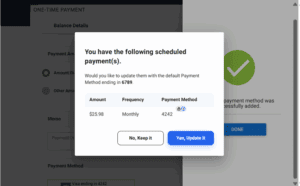
This feature allows users to automatically update all future scheduled payments to use their newly selected default payment method. When a user changes their default payment method (e.g., bank account, credit card), the system will prompt this change to all upcoming scheduled payments, ensuring consistency and reducing manual effort.
Process: Updating existing scheduled payments with default payment method
1. Add & Set Default Payment Method
The homeowner adds a new payment method (e.g., bank account or card) and sets it as the default.
2. Trigger Pop-Up Notification
A pop-up appears showing a list of existing scheduled payments that are currently linked to the previous payment method.
The pop-up includes two action buttons:
- “Yes, Update It”
- “No, Keep It”
3. User Chooses to Update
If the homeowner clicks “Yes, Update It”, the system updates all listed scheduled payments to use the newly set default payment method.
4. User Chooses to Keep Existing Method
If the homeowner clicks “No, Keep It”, the scheduled payments remain associated with the previous payment method.
Benefit
1. Improved User Experience
Reduces the need for manual updates to each scheduled payment.
Ensures seamless transition when switching payment methods.
2. Improved User Experience
Minimizes errors or missed payments due to outdated payment details.
Saves time for users and support teams by automating updates.
3. Consistency Across Transactions
Ensures all future payments reflect the user’s preferred method.
Avoids discrepancies between default settings and scheduled actions.
4. Reduced Risk of Payment Failures
Keeps payment information current, reducing failed transactions due to expired or invalid methods.
September 16th, 2025
What’s New?
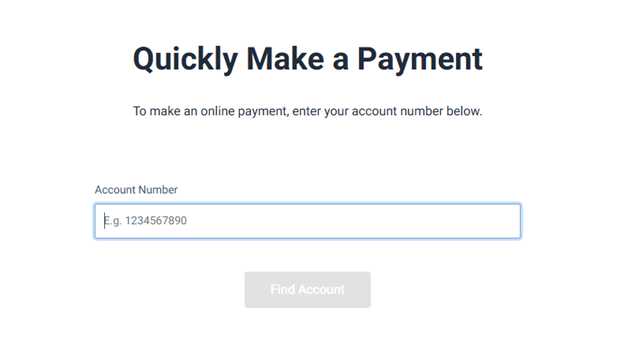
QuickPay – Secure Account Number Retrieval via Email
Feature Overview:
Homeowners who forget their account number can now click “Forgot your Account?” link to retrieve it via email. This feature is hidden behind a Feature Flag at MC and will be enabled upon request.
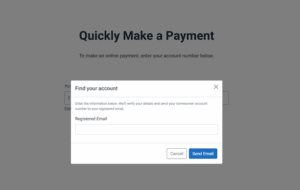
Process of Account Number Retrieval in QuickPay
- Click the Link
On the QuickPay screen, the homeowner clicks the “Forgot your Account?” link. - Popup Appears
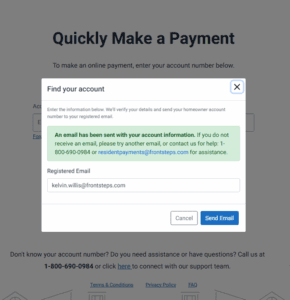
A popup window prompts the user to enter their registered email address. - Email Validation
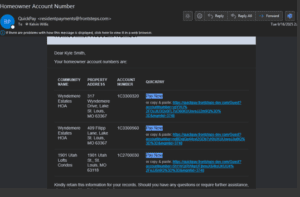
The system checks if the entered email matches a registered homeowner. - Email Sent
If a match is found, the system sends a secure email containing:
- All account numbers associated with the user
- A “Pay Now” button next to each property
- A direct payment link for each account
Benefit:
- Reduces support call volume, especially during high-traffic periods like the Superbowl of Payments
- Improves user experience and self-service capabilities
FRONTSTEPS
ALLi
January 16th, 2026
What’s New
Workflows: Intelligent Checklists in Step Creation (Pro tier feature)
Transform the Step creation in FRONSTEPS Manager modal into a collaborative workflow builder that mixes automation from ALLi with human-in-the-loop checkpoints. Managers can assign tasks to ALLi, schedule and recur work, embed structured prompts, and route individual checklist items to teammates—all from one place.
Feature Overview:
The updated Step creation experience now functions as a lightweight workflow engine tailored to HOA operations. When creating a Step, managers can:
- Assign ALLi as an Assignee: Choose ALLi as the task owner for any checklist item to have it executed automatically in the background.
- Build Reorderable Checklists: Break a Step into clear, movable checklist items to mirror the exact process you follow.
- Embed Structured Prompts (Markdown): Add rich, markdown-based instructions to guide ALLi—include data points, links, and formatting to standardize outcomes.
- Use Inline @Mentions for Routing: Assign items with
@mentions(e.g.,@allifor AI execution or@alexfor a teammate). Mentions drive automatic assignment and clarify ownership. - Automated Comment Responses: As ALLi completes her items, she posts results directly into the Step’s comments—creating a running, auditable transcript.
- Context-Aware Follow‑Ups: ALLi automatically uses prior comments and outcomes as context for subsequent items, improving relevance and continuity.
- Auto‑Attach Outputs: Files or reports generated by ALLi are attached to the Step automatically for easy review and sharing.
- Hybrid Execution Rules: ALLi executes only the checklist items addressed to
@alliand pauses when the workflow reaches items assigned to people. Once the human completes their item, processing continues with subsequent AI-assigned tasks—no manual restarts required.
Benefits:
- Hybrid Automation, On Your Terms: Seamlessly blend AI and human steps so routine work is automated while key decisions stay with people.
- Clear Ownership & Accountability:
@mentionsassign every item to either ALLi or a teammate, eliminating ambiguity and handoff delays. - Consistency at Scale: Markdown prompts standardize instructions, ensuring ALLi delivers predictable, repeatable results across communities.
- Faster Cycle Times: Scheduling and recurrence reduce lag between steps and keep recurring work moving without manual kicks.
- Richer, Traceable Audit Trail: ALLi’s comment posts and auto‑attached outputs create a complete record of what ran, when, and by whom.
- Fewer Reworks Through Context: By reading prior comments, ALLi tailors follow‑up actions to the latest information rather than starting from scratch.
- Flexible Orchestration: Reorderable checklists make it easy to adapt processes as requirements change—no heavy reconfiguration needed.
November 17th, 2025
What’s New?
Microsoft Outlook Integration – Premium Feature
You can now connect your Microsoft Outlook account to ALLi to sync important email communications and enhance cross-platform workflows.
Feature Overview:
- Centralizes communication for easier follow-up and collaboration.
- Improves task context and reduces time spent switching between tools.
Benefits:
- Securely connects Outlook to ALLi for email integration.
- Lets you link emails to tasks, agents, or packets directly.
Smarter Visuals for Board Packet Generation
Report groups are now auto-attached during board packet creation, reducing manual setup and ensuring consistent outputs.
Feature Overview:
- Automatically links report groups to packet fields using predefined rules.
- Applies preset grouping criteria to minimize manual adjustments.
Benefits:
- Saves time preparing board packets.
- Reduces errors from manual group assignments.
Targeted Interactions with Specific Agents
You can now direct your questions to a specific agent in ALLi, enabling more accurate and relevant responses.
Feature Overview:
- Supports agent-specific parameters for precise routing.
- Delivers focused processing in complex workflows.
Benefits:
- Gives admins greater control over automation behavior.
- Optimizes multi-agent workflows with targeted responses.
Caliber Fact Sheet Integration
ALLi now pulls in Caliber fact sheets, bringing key property information directly into your reports for seamless meeting prep and review.
Feature Overview:
- Fetches fact sheet data from Caliber systems into ALLi.
- Displays that information within ALLi’s reporting views.
Benefits:
- Centralizes key property facts for board and manager use.
- Improves visibility into community metrics and reporting.
Enhanced Agent Profile Descriptions
Agent profiles now include detailed notes that describe each agent’s capabilities, helping users quickly understand what each agent can do and select the right one for the job.
Feature Overview:
- Store rich descriptions and metadata with agent profiles.
- Improves discoverability and understanding in support tools.
Benefits:
- Speeds up onboarding and troubleshooting for support staff.
- Reduces miscommunication with better documentation.
Click-to-Link Report Groups
The front-end interface now lets users visually connect report groups to board packets during creation or editing, with built-in guidance to avoid errors.
Feature Overview:
- UI to visually link report groups during packet setup.
- Includes inline validation and proactive guidance.
Benefits:
- Streamlines setup and reduces configuration mistakes.
- Minimizes need for support assistance on packet setup.
Fixed Task Assignment Bug
Resolved an issue where tasks created by ALLi were sometimes assigned to the wrong Suite Manager. Assignments now work as expected.
Feature Overview:
- Corrected logic for automated task assignments.
- Ensures tasks go to the right Suite Manager every time.
Benefits:
- Improves accountability through accurate task ownership.
- Reduces time spent fixing assignment errors.
Export Full Chatbot Conversations to PDF – ALLi
You can now export entire chatbot conversations in ALLi to PDF for recordkeeping or audit purposes.
Feature Overview:
- One-click PDF export for full chatbot transcripts.
- Ideal for archiving or compliance reviews.
Benefits:
- Easy to store and share conversation records.
- Supports compliance, training, and reporting needs.
November 3rd, 2025
What’s New?
Core Voice Support (Phase 1)
Talk to ALLi using your microphone for hands-free, natural interaction. Phase 1 delivers the foundation of voice-first productivity.
Feature Overview:
Voice input is now available to initiate and continue conversations with ALLi without typing. This release focuses on reliable microphone capture, clear permission handling, and smooth handoff into the existing chat experience.
Benefits:
- Hands-free productivity: Ideal for managers in the field or while multitasking.
- Accessible by design: Reduces friction for users who prefer speaking to typing.
- Platform for growth: Establishes the base for future “do this by voice” actions.
Support Site – Agent Description Datapoint
Standardized “Agent Description” metadata is now available to enrich discovery and documentation.
Feature Overview:
Each agent on the Support Site now includes a consistent description field, enabling clearer explanations of purpose and scenarios. This metadata supports AI Hub views and external API consumers that index or display your agent library.
Benefits:
- Consistent documentation: Clear, comparable agent profiles across your library.
- Better discovery: Easier for teams to find the right agent for the job.
- Integration-ready: Cleaner downstream use by hubs, training content, and APIs.
Support Site – Agent Description Datapoint
Standardized “Agent Description” metadata is now available to enrich discovery and documentation.
“Top 10 Prompts” (Replaces Pre-Defined Prompts)
Data-informed starter prompts replace the static list to help users get value faster.
Feature Overview:
ALLi now surfaces a dynamic Top 10 Prompts set on the home and/or empty state screens. These prompts are selected from real usage patterns to maximize clarity and jump-start productive conversations.
Benefits:
- Faster first win: Shortens time-to-value for new and returning users.
- Higher engagement: Prompts reflect what users actually do most. Evolves with usage: Room to rotate or A/B test by role over time.
- Evolves with usage: Room to rotate or A/B test by role over time.
Sidebar Navigation Menu
A persistent left-hand sidebar organizes ALLi into intuitive sections to improve discovery and scalability.
Feature Overview:
The new sidebar groups core areas (e.g., Documents, Prompts, Agents) and provides a stable home for future ALLi “apps.” It reduces clicks, shortens learning curves, and makes room for multimodal features.
Benefits:
- Speed to action: Find what you need faster with fewer page hops.
- Designed to scale: A framework that accommodates new features gracefully.
- Higher adoption: Clearer wayfinding increases feature discovery.
- Workflow Consistency: Matches Caliber’s compliance standards while streamlining steps in Suite Manager.
- Fewer Handoffs: Allows CAMs to progress violations independently.
What’s Improved
Date & Time Awareness Accuracy
Restores trustworthy scheduling and time-based logic across ALLi.
Previous Behavior:
In certain contexts, ALLi referenced an outdated date (commonly June 2024), which could misalign reminders, scheduling, and other time-sensitive logic for some users and roles.
Resolution:
Temporal handling has been corrected to consistently reference current system date and respect time zones across supported environments.
Benefit:
Reliable planning: Accurate dates/times improve trust in reminders, schedules, and automations.
Omnisearch Filter Reliability
Filters now return complete, consistent results across complex queries.
Previous Behavior:
Some users saw incomplete or inconsistent results when applying certain Omnisearch filters, which disrupted data-heavy workflows.
Resolution:
Filtering logic and validations were refined to ensure expected results across edge cases and combined parameters.
Benefit:
Confidence in results: Teams can rely on search to find the right records without manual workarounds.